






TL;DR: Heavy JavaScript can block the browser’s main thread, slowing down page interactions and hurting Core Web Vitals, especially Interaction to Next Paint (INP). To reduce JavaScript execution time, remove unused JavaScript, optimize third-party scripts, split large bundles, defer non-critical scripts, use lazy loading, and regularly monitor performance with PageSpeed Insights and Lighthouse.
JavaScript powers many of the interactive features users expect today, from navigation menus and product filters to live chat, analytics, and checkout experiences. However, when browsers spend too much time downloading and executing JavaScript, pages become less responsive, leading to poor user experiences and lower Core Web Vitals scores.
If you’ve seen a “reduce JavaScript execution time” warning in Google PageSpeed Insights or Lighthouse, it means your browser is spending too much time processing scripts instead of rendering content and responding to user interactions.
The good news is that you don’t need to remove JavaScript entirely. By loading scripts more efficiently and eliminating unnecessary code, you can significantly improve responsiveness, optimize JavaScript performance, and achieve better Core Web Vitals.
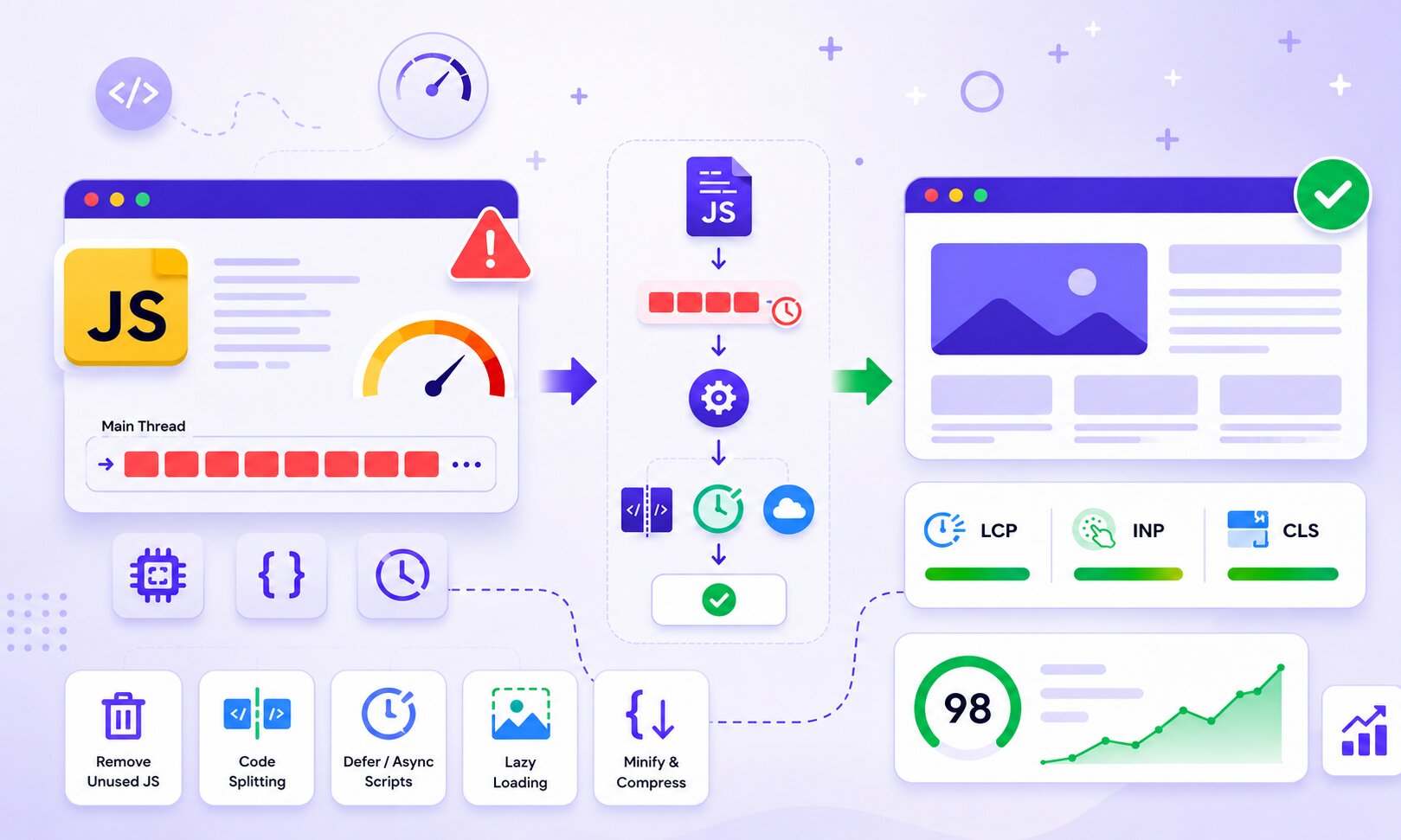
Quick Ways to Optimize JavaScript Execution Time
Use these proven JavaScript optimization techniques to reduce browser processing, improve Core Web Vitals, and create a faster, more responsive website.
| JavaScript Optimization Method | How It Improves Performance |
|---|---|
| Remove unused JavaScript | Reduces unnecessary browser processing and lowers main-thread work |
| Delay non-critical scripts | Prevents JavaScript from blocking initial page rendering |
| Optimize third-party scripts | Reduces performance issues caused by analytics, ads, and widgets |
| Use code splitting | Loads only the JavaScript needed for each page or feature |
| Enable lazy loading | Delays non-essential JavaScript until it’s required |
| Minify and compress JavaScript | Reduces file size and improves loading efficiency |
| Break down long tasks | Helps the browser respond faster to user interactions and improves INP |
By reducing unnecessary JavaScript execution, websites become faster, more responsive, and better equipped to meet Google’s Core Web Vitals recommendations.
What Is JavaScript Execution Time?
JavaScript execution time is the amount of time a browser spends parsing, compiling, and executing JavaScript code after it has been downloaded.
Every script added to a webpage requires browser resources. If there are too many scripts or they perform complex tasks, the browser’s main thread stays busy processing JavaScript instead of rendering content or responding to user interactions.
That’s why even websites hosted on fast servers can still feel slow when browsers spend too much time processing JavaScript.
Why JavaScript Execution Time Matters for Core Web Vitals
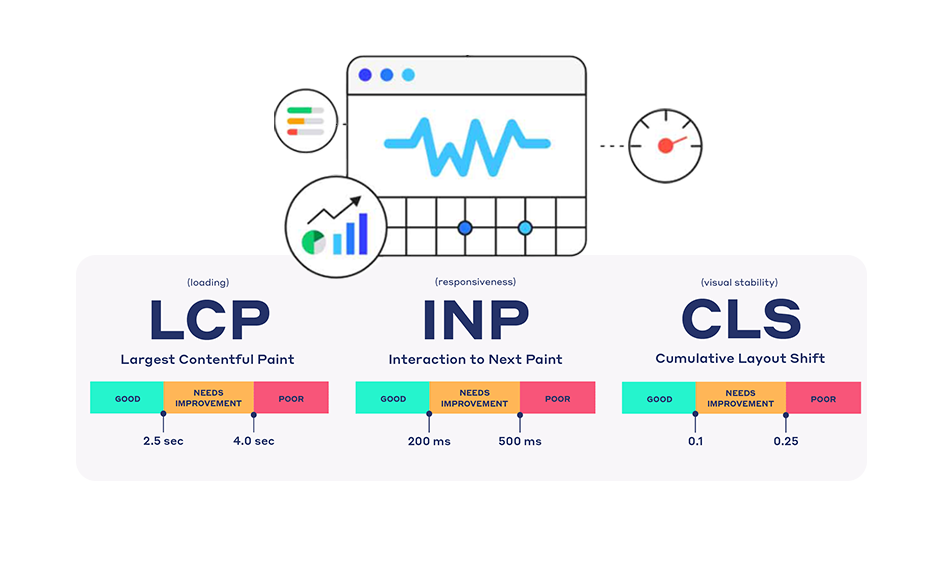
Google’s Core Web Vitals measure how users experience a webpage in terms of loading speed, responsiveness, and visual stability. Excessive JavaScript execution time directly affects responsiveness and can indirectly delay page rendering.
Heavy JavaScript primarily impacts Interaction to Next Paint (INP) by blocking the browser’s main thread. If the browser is busy executing scripts, user actions like clicking a button, opening a menu, or adding a product to the cart must wait until those tasks are complete.
In performance testing tools, excessive JavaScript execution often increases Total Blocking Time (TBT), a lab metric that closely reflects how responsive a page feels during loading.
JavaScript can also contribute to slower Largest Contentful Paint (LCP) by delaying when important page elements are rendered.
How to Reduce JavaScript Execution Time (8 Proven Techniques)
Start with these practical techniques to optimize JavaScript performance, reduce main-thread blocking, and deliver a smoother user experience across desktop and mobile devices.
1. Remove Unused JavaScript
One of the quickest ways to reduce JavaScript execution time is to eliminate code that isn’t actually used.
Many websites continue loading scripts from old plugins, themes, marketing tools, or features that visitors never interact with. Although these scripts provide no real value, browsers still have to download, parse, and execute them.
Google PageSpeed Insights and Lighthouse often highlight related opportunities such as “Reduce JavaScript execution time,” “Reduce unused JavaScript,” and “Minimize main-thread work“. Removing or conditionally loading unnecessary code reduces main-thread work and improves overall JavaScript performance.
For example, if a product comparison feature is only available on product pages, there’s no reason to load its JavaScript on your homepage or blog.
2. Optimize Third-Party Scripts
Third-party scripts are among the biggest causes of excessive JavaScript execution time.
Common examples include:
- Analytics platforms
- Advertising scripts
- Live chat widgets
- Social media embeds
- Heatmaps
- Marketing and tracking pixels
While each script may seem lightweight on its own, loading several third-party services simultaneously can significantly increase browser processing time.
Instead of installing every available marketing tool, audit them regularly and remove scripts that no longer provide value. You should also load third-party scripts only on pages where they’re actually needed.
3. Split Large JavaScript Bundles
Many websites deliver all their JavaScript in a single large file, even though visitors only use a small portion of it. Code splitting improves JavaScript optimization by dividing large bundles into smaller files that load only when required.
For example, checkout-related JavaScript doesn’t need to load when someone is reading a blog article, and account management scripts aren’t necessary for first-time visitors browsing your homepage.
Instead of downloading every feature upfront, browsers only process the code needed for the current page. This reduces JavaScript execution time and improves page responsiveness.
Modern frameworks like React, Vue, Angular, and Next.js all support dynamic imports and code splitting to optimize JavaScript performance.
4. Defer or Async Non-Critical JavaScript
Not every script needs to execute before users can view or interact with your page.
Critical scripts should load first, while non-essential JavaScript, such as analytics, chat widgets, or social media integrations, can often be delayed using the defer or async attributes.
For example:
<script defer src="main.js"></script>
Using defer allows the browser to continue parsing HTML while downloading the script, executing it only after the page structure has been built.
Similarly:
<script async src="analytics.js"></script>
The async attribute downloads and executes scripts independently, making it suitable for scripts that don’t depend on the HTML document or other JavaScript files.
Using these attributes correctly helps reduce render-blocking behavior and improve overall website speed optimization.
5. Use Lazy Loading for Non-Critical JavaScript
Lazy loading isn’t just for images. It helps reduce the browser’s initial JavaScript workload by delaying non-essential scripts until users actually need them.
For example, these features don’t always need to load when the page first opens:
- Interactive maps
- Video players
- Customer reviews
- Live chat widgets
- Recommendation engines
Loading them only after users scroll or interact with the page reduces the browser’s initial workload and helps improve Core Web Vitals.
However, avoid lazy loading critical resources like your navigation or above-the-fold content, as this can negatively affect loading performance.
6. Minify and Compress JavaScript Files
JavaScript files often contain comments, whitespace, and formatting that make them easier for developers to read but are unnecessary for browsers.
Minifying JavaScript removes this extra code, reducing file size and improving download speed. Combining minification with compression methods such as Gzip or Brotli further reduces the amount of data transferred to the browser.
Modern build tools like Webpack, Vite, Rollup, and esbuild can automate this process, making JavaScript optimization a standard part of your deployment workflow.
7. Break Up Long JavaScript Tasks
A Long Task occurs when JavaScript keeps the browser’s main thread busy for more than 50 milliseconds. During this time, the browser can’t respond to user interactions, resulting in poor responsiveness and higher INP.
Instead of running large operations all at once, break them into smaller tasks so the browser has opportunities to update the page and respond to user input.
Common causes of long tasks include:
- Large DOM updates
- Heavy animations
- Complex calculations
- Inefficient event handlers
- Processing large datasets
8. Monitor JavaScript Using PageSpeed Insights and Lighthouse
Optimization doesn’t end after making changes. Regularly measuring JavaScript performance helps identify new issues before they affect users.
Both Google PageSpeed Insights and Lighthouse report JavaScript-related opportunities, including:
- Reduce JavaScript execution time
- Reduce unused JavaScript
- Minimize main-thread work
- Long JavaScript tasks
- Render-blocking resources
PageSpeed Insights combines Lighthouse lab data with real-user Chrome data when available, while Lighthouse provides more detailed debugging information.
How to Identify JavaScript Execution Time Issues Using PageSpeed Insights
If your website feels slow or PageSpeed Insights reports JavaScript-related issues, start by running a performance audit.
Look for audits such as:
- Reduce JavaScript execution time
- Reduce unused JavaScript
- Minimize main-thread work
- Long Tasks
- Total Blocking Time (TBT)
These reports identify which scripts consume the most browser processing time, helping you prioritize optimization efforts.
Remember that lab scores don’t always reflect real-world performance. Pair performance audits with real-user monitoring to understand how JavaScript affects actual visitors.
Benefits of Reducing JavaScript Execution Time
Reducing JavaScript execution time doesn’t just improve one metric, it enhances the overall user experience.
Optimized JavaScript helps:
- Improve INP by reducing input delays
- Reduce main-thread blocking
- Speed up page interactions
- Improve overall website responsiveness
- Increase your website speed score in performance testing tools
However, don’t optimize solely for a higher score. A website can achieve excellent Lighthouse or GTmetrix scores and still feel slow if users experience delays caused by JavaScript, network conditions, or device limitations.
That’s why it’s important to focus on real user experience alongside testing tools.
Common JavaScript Optimization Mistakes to Avoid
Optimizing JavaScript involves more than applying performance techniques. Avoiding common implementation mistakes is just as important for reducing JavaScript execution time and improving Core Web Vitals.
| Mistake | Better Approach |
|---|---|
| Loading all scripts on every page | Load JavaScript only where it’s needed |
| Installing too many third-party tools | Audit and remove unnecessary scripts regularly |
| Delivering one large JavaScript bundle | Split code into smaller bundles |
| Keeping unused plugins and libraries | Remove or replace unused JavaScript |
| Using blocking scripts | Load non-critical scripts with defer or async |
Conclusion
Reducing JavaScript execution time is one of the most effective ways to improve Core Web Vitals and create a faster, more responsive website. Instead of removing JavaScript altogether, focus on delivering it more efficiently by eliminating unused code, optimizing third-party scripts, splitting large bundles, delaying non-critical resources, and regularly monitoring performance with PageSpeed Insights and Lighthouse.
Combined with other website speed optimization best practices, these techniques help reduce main-thread work, improve user interactions, and build a smoother browsing experience across both desktop and mobile devices.
Frequently Asked Questions
1. What does "Reduce JavaScript execution time" mean in PageSpeed Insights?
2. Why does JavaScript execution time affect Core Web Vitals?
3. How can I reduce JavaScript execution time without breaking my website?
4. Does reducing JavaScript execution time improve Google rankings?
5. What causes high JavaScript execution time?
6. How do I find unused JavaScript?
About the Author