TL;DR: Preloading improves above-the-fold speed and Core Web Vitals by prioritizing critical resources, while lazy loading boosts overall efficiency by deferring off-screen content. The best-performing websites use both strategically for faster loading and better SEO.
Every second your page takes to load costs you visitors. Google’s own data shows that 53% of mobile users abandon a site that takes longer than three seconds to load. Yet one of the most persistent performance mistakes developers make is applying loading strategies indiscriminately, lazy loading everything in sight, or preloading resources that never actually block rendering.
The lazy loading vs preloading debate isn’t really about which one is better in isolation. It’s about understanding what each technique does, where it shines, and critically, where misusing it can actively hurt you. Let’s break this down properly, with real-world data to back it up.
What Is Lazy Loading, and How Does It Work?
Lazy loading is a performance optimization technique that defers the loading of non-critical resources, images, videos, iframes, and JavaScript until the user actually needs them. Instead of requesting every asset the moment a page loads, the browser holds off until the user scrolls near that content.
The most straightforward implementation today is the native HTML attribute:
<img src="product-photo.jpg" loading="lazy" width="800" height="600" alt="Product photo">
That single attribute tells the browser: “Don’t bother fetching this until it’s about to enter the viewport.” No JavaScript library required, no extra overhead.
Benefits of Lazy Loading
- Faster initial page load: Only above-fold content loads on arrival, reducing page weight immediately.
- Lower bandwidth consumption: Assets the user never scrolls to are never downloaded.
- Better mobile performance: Lighter initial payloads help users on slow connections and limited data plans.
- Improved Core Web Vitals: Deferring non-critical resources keeps the main thread clear during the first render.
- SEO-positive for below-fold content: Faster pages often improve user engagement metrics and are associated with stronger search performance.
Why Lazy Loading Helps Website Performance
For image-heavy pages, e-commerce product grids, blog archives, and portfolios, lazy loading can dramatically cut initial page weight. This improves perceived load speed, reduces initial page weight, lowers bandwidth usage for users who never scroll to the bottom, and conserves server resources. It also benefits mobile users specifically, who are operating on limited data and slower processors.
The SEO benefit is real, too. Lazy loading below-the-fold images improves page speed signals that Google uses in its ranking algorithm. Faster pages generally correlate with better Core Web Vitals scores, lower bounce rates, and stronger organic visibility.
What Is Preloading, and Why Does It Matter?
Preloading is the opposite philosophy: instead of deferring resources, you tell the browser to fetch specific assets earlier than it would naturally discover them.
You do this with the <link rel="preload"> tag in the document <head>.
<link rel="preload" href="/images/hero-banner.webp" as="image" fetchpriority="high">
This is not a hint, it’s a directive. The browser will fetch that resource at high priority, before it has even finished parsing the rest of the HTML. For resources that are critical to the initial render, your hero image, a key web font, and a render-blocking stylesheet, this can shave hundreds of milliseconds off perceived load time.
Preloading resources for speed matters most when an asset is late-discovered. Browser parsers are good at finding <img> tags early, but they can miss images referenced in CSS files, fonts loaded through stylesheets, or assets injected by JavaScript. Preloading bridges that gap.
Benefits of Preloading
- Faster LCP scores: Fetching the hero image early is one of the highest-impact optimizations for image-based LCP elements.
- Eliminates late-discovery delays: Bridges the gap for fonts, CSS background images, and JS-injected assets that the preload scanner misses.
- Prevents flash of unstyled text (FOUT): Preloading web fonts ensures styled text renders on the first paint.
- Reduces render-blocking bottlenecks: Critical CSS and scripts arrive before they’re needed, unblocking the render pipeline.
- Directly boosts Core Web Vitals pass rates: Preloaded LCP images achieve “good” scores vs. measurable failure rates for lazy-loaded ones.
When Should You Use Preloading Instead of Lazy Loading?
Preloading should take priority whenever an asset is visible on first load or would be discovered too late by the browser without causing a delay. Here are the clearest signals to reach for preload over lazy load:
-
Your LCP or hero image:
Non-negotiable. Never lazy-load it; preload it with
fetchpriority="high". - Above-fold web fonts: Browsers discover fonts only after parsing CSS, causing a flash of unstyled text. Preloading eliminates that gap.
-
CSS background images:
The preload scanner can’t detect these at all. Without a
<link rel="preload">, they load late by default. - Critical interactive JS: Any script controlling above-fold interactions (menus, widgets) should load early, not be deferred.
- Resources inside resource chains: Fonts or images injected by JS components create waterfall delays. Preloading short-circuits them.
A simple test, if removing this asset from the first two seconds would break something the user sees or clicks, then preload it. If it lives below the fold, lazy-load it.
Which Resources Should You Preload First?
Preloading is powerful, but restraint matters. Preloading too many resources clogs the network with high-priority requests, defeating the purpose. Good candidates for preloading include:
- The LCP hero image (always)
- Critical web fonts that appear above the fold
- Render-blocking CSS not already in the
<head> - Key JavaScript files needed for initial interactivity
Resources to skip for preloading, and lazy load instead, include images in carousels beyond the first slide, below-the-fold product images, off-screen video thumbnails, and any content the user has to scroll to reach.
Lazy Loading vs Preloading: The Core Difference
The simplest way to frame the lazy loading vs preloading performance comparison is this:
- Lazy loading reduces the cost of loading a page by skipping things the user hasn’t asked for yet.
- Preloading reduces the delay on things the user will definitely see, making them load faster than the browser would naturally load them.
They’re not competing strategies. They’re complementary tools for different parts of the same page.
| Technique | Best For | Risk if Misused |
|---|---|---|
| Lazy Loading | Below-the-fold images, off-screen iframes, non-critical JS | Hurts LCP if applied to above-fold content |
| Preloading | Hero images, LCP elements, critical fonts, key CSS | Wastes bandwidth if overused on non-critical assets |
How to Improve LCP with Preload
To improve LCP with preload, you need to ensure your hero image is fetched as early as possible in the page load sequence. The correct implementation combines a <link rel="preload"> in the <head> with fetchpriority="high" on the <img> tag itself:
    <!-- In the <head> -->
    <link rel="preload" href="/images/hero-banner.webp" as="image" fetchpriority="high">

    <!-- In the <body> -->
    <img src="/images/hero-banner.webp" fetchpriority="high" width="1200" height="600" alt="Hero banner">
Make sure the href in the preload tag matches the src in the img tag exactly. A mismatch causes the browser to download the resource twice, once from the preload hint and once when it encounters the img tag, which is worse than not preloading at all.
Lazy Loading vs Preloading: Which Is Better for Website Speed?
Here’s the direct answer: it depends on which part of the page you’re optimizing, but preloading wins where it counts most.
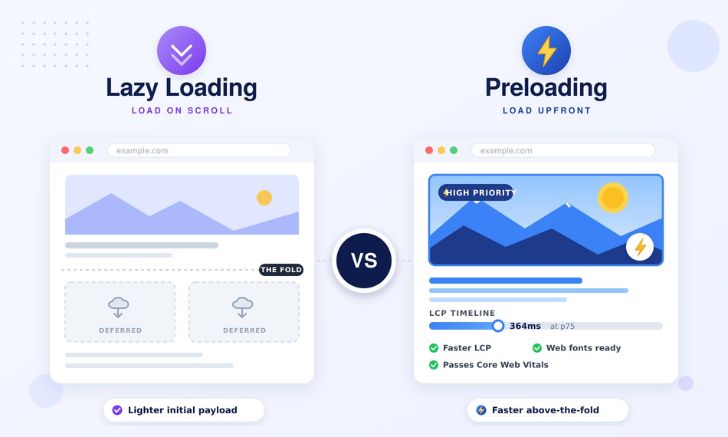
For initial page load and Core Web Vitals, preloading is the stronger tool. It ensures your hero image, fonts, and critical CSS are fetched before the browser finishes reading the HTML, driving a faster Largest Contentful Paint and First Contentful Paint. The data backed by Corewebvitals.io states that preloaded LCP images score 364ms at the 75th percentile with 100% good scores, lazy-loaded ones sit at 720ms with measurable failure rates.
For overall session efficiency, lazy loading holds its own. Below-the-fold product grids, embedded videos, and long-scroll content have no business loading on arrival. Lazy loading reduces data transfer, keeps the main thread lighter, and protects performance on slower connections.
The practical answer: preloading improves the website speed that users and Google measure first; lazy loading improves everything after. A page that preloads critical resources and lazy loads the rest will consistently outperform one that applies either technique in isolation.
Lazy Loading for SEO: What Google Actually Thinks
Native lazy loading (loading=”lazy”) is fully supported by Googlebot. Google crawls and indexes images with this attribute without issue. The concern isn’t with the attribute itself, it’s with the implementation choices around it.
Martin Splitt from Google’s Search Relations team confirmed in August 2025 that JavaScript-based lazy loading libraries that store the real image URL in data-src rather than src are an indexing risk. Googlebot will not reliably index images without a proper src attribute. If you’re using a custom library, always include a <noscript> fallback with the full image tag.
The takeaway for lazy loading for SEO: use native lazy loading, apply it only to below-the-fold content, always include explicit width and height attributes to prevent Cumulative Layout Shift, and never apply it to any element that could be your page’s LCP candidate.
The Combined Strategy: How to Use Both Together
The most performant websites don’t choose between lazy loading and preloading, they deploy both strategically. Here’s a practical framework:
Above the fold:
Eager loading + fetchpriority="high" on the LCP image + a matching <link rel="preload"> in the <head>. No lazy loading.
Second viewport (partially visible on scroll): Eager loading or a short preload threshold. Don’t lazy-load content that the user is likely to see within the first second.
Below the fold: Native loading="lazy" on all images and iframes. Let the browser handle viewport detection.
Non-critical JavaScript: Use defer or async attributes. Code-split large bundles so only what’s needed on the first render gets loaded initially.
This layered approach is what separates a page that scores 92 on PageSpeed but loses traffic from one that scores 85 and consistently passes Core Web Vitals in the field.
Conclusion
The lazy loading vs preloading question doesn’t have a single winner, it has a right answer for each element on your page. Preloading is the tool for speed-critical above-the-fold content, particularly your LCP image. Lazy loading is the tool for everything below the fold that doesn’t need to load until the user gets there.
The real performance gains come from using both correctly: preload what the user will see immediately, lazy load everything else, and never, under any circumstances, apply lazy loading to your LCP element. That single decision accounts for the difference between passing and failing Core Web Vitals at scale, and the data makes it conclusive.
Frequently Asked Questions
Q1: Which is better for website speed: lazy loading or preloading?
Q2: Should above-the-fold images be lazy loaded?
Q3: What resources should be preloaded?
Q4: When should you use preload instead of lazy loading?
Q5: How does preload improve page rendering?
Q6: Can lazy loading hurt SEO?
About the Author