TL;DR: If cumulative layout shift is still happening after fixing images, ads, and other common CLS issues, hidden layout shift causes may be responsible. Cookie banners, third-party widgets, font swapping, lazy-loaded components, client-side rendering, and post-load content updates often create unexpected layout shifts that are easy to overlook during CLS troubleshooting.
One of the most frustrating Core Web Vitals situations is seeing CLS issues not going away despite following every recommendation from PageSpeed Insights.
You’ve added width and height attributes to images. You’ve optimized ads. The lighthouse looks better than before. Yet Search Console continues reporting poor CLS performance, or real-user monitoring tools show cumulative layout shifts still happening. The reason is simple: not all layout shifts happen during the initial page load.
Google measures CLS based on real user experiences, including shifts that occur after content appears on screen. Many websites pass basic layout stability checks while still experiencing unexpected layout shifts caused by dynamic content, third-party integrations, and post-load rendering behavior.
This is why CLS troubleshooting often requires looking beyond the traditional causes and investigating what happens throughout the entire page lifecycle.
Why Is My CLS Still High? 8 Hidden Causes to Check
CLS issues often remain high because many layout shifts happen after the initial page load. While images, videos, and ad dimensions are common causes, hidden factors such as cookie banners, third-party widgets, font swapping, lazy-loaded components, and more can continue generating layout shifts that affect real-user Core Web Vitals data. If you’ve already fixed the obvious CLS issues, use this table to identify the hidden layout shift causes that may still be affecting your score.
The Hidden Layout Shift Causes Beyond the Common Issues
If you’ve already addressed common CLS issues such as image dimensions, media sizing, and ad placeholders, the following hidden layout shift causes may be responsible for the remaining layout instability on your site.
Cause 1: Cookie Consent and Compliance Banners
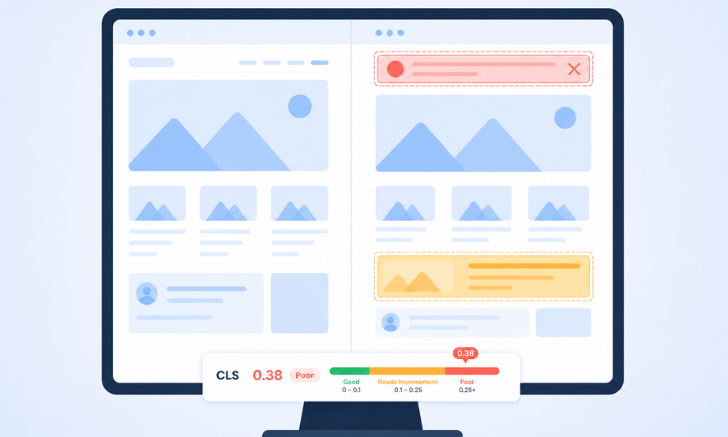
Cookie consent banners are among the most common hidden layout shift causes. Many consent management platforms inject banners only after JavaScript execution finishes. By the time the banner appears, users may already be reading content near the top of the page. The banner then pushes everything downward, creating a measurable layout shift.
What Happens
A visitor lands on the page and starts reading. A few moments later, the cookie banner appears at the top. The content shifts down unexpectedly.
How to Fix It
Instead of inserting banners after rendering:
- Reserve space for the banner during initial page load.
- Use fixed-position overlays when possible.
- Render consent banners server-side rather than injecting them later.
These approaches prevent visible content from moving after users begin interacting with the page.
Cause 2: Third-Party Widgets and Embedded Tools
Many websites unknowingly introduce layout instability through third-party scripts such as chat widgets, review platforms, social embeds, booking tools, and marketing popups.
What Happens
These elements often load after the page has rendered and may expand or inject new content, causing surrounding elements to shift.
How to Fix It
- Reserve space for widgets before loading.
- Set minimum heights for embeds.
- Use fixed-position elements for chat launchers.
- Audit third-party scripts regularly.
When investigating why the layout shift score is not improving, third-party integrations should always be one of the first areas to review.
Cause 3: Web Font Metric Mismatches
Most developers know fonts can affect performance. Fewer realize they can significantly contribute to cumulative layout shift causes.
When a browser initially displays a fallback font and later swaps it with a custom web font, differences in spacing, character widths, and line heights can force content to reflow. For example:
A headline occupies two lines using a fallback font. After the custom font loads, the same headline expands into three lines. Everything below shifts downward.
What Happens
The browser often displays a fallback font before the custom font loads. When the final font replaces it, differences in spacing, character widths, or line heights can cause text to reflow and create layout shifts.
How to Fix It
- Preload critical fonts.
- Use font-display: optional where appropriate.
- Match fallback font metrics using CSS size-adjust.
- Reduce unnecessary font variations and weights.
Even small text reflows can accumulate into meaningful CLS scores across a page.
Cause 4: Lazy-Loaded Components Without Reserved Space
Lazy loading is excellent for performance, but poor implementation frequently causes layout instability. Many websites delay loading:
- Product carousels
- Recommended content
- Related articles
- Testimonials
- Interactive components
The problem occurs when no space is reserved beforehand.
What Happens
The section initially occupies zero height. When content loads, the browser inserts the component and pushes everything below it downward.
How to Fix It
Reserve space before content loads by using:
- Skeleton screens
- Placeholder containers
- Minimum height declarations
This allows content to load without altering the surrounding layout.
Cause 5: Client-Side Rendering and Hydration Delays
Modern JavaScript frameworks can sometimes create hidden layout shift causes even when the page initially appears stable. In client-side rendering environments, content often arrives in stages:
- Initial HTML loads.
- JavaScript executes.
- Dynamic content is rendered.
- Components hydrate and become interactive.
If the final rendered content differs significantly from the initial placeholder state, layout shifts can occur.
What Happens
Dynamic content may appear or expand once JavaScript executes and components hydrate, changing the page layout.
How to Fix It
- Prefer server-side rendering where possible.
- Reserve space for dynamic components.
- Ensure placeholders closely match final content dimensions.
- Minimize layout differences during hydration.
Cause 6: Post-Load Personalization and Dynamic Content
Some of the most difficult CLS issues to diagnose happen after a page appears fully loaded. Personalization tools, recommendation engines, and experimentation platforms often modify content based on user behavior. Examples:
- Personalized product recommendations
- A/B testing platforms
- Dynamic promotions
- Recently viewed products
- Location-based content
Because these updates occur after rendering, they may not appear in Lighthouse audits but still affect real users.
What Happens
New content is inserted, or existing sections are updated after rendering, causing unexpected layout shifts.
How to Fix It
- Reserve space for personalized modules.
- Avoid inserting content above visible elements.
- Load dynamic sections within dedicated containers.
- Test layouts using real-user monitoring tools.
This is one of the biggest reasons cumulative layout shift still often happens in field data but not in lab reports.
Cause 7: CSS Animations That Trigger Reflow
Animations can enhance the user experience, but some animation techniques unintentionally create layout instability. When an animation modifies layout-related properties, the browser must recalculate positions and dimensions for surrounding elements, which can result in unexpected layout shifts.
For example, if an expanding banner increases its height during an animation, every element below it may be pushed downward, contributing to cumulative shifts.
What Happens
Animating properties such as width, height, margin, or position forces the browser to recalculate the layout of nearby elements.
How to Fix It
Whenever possible, animate properties that don’t affect document layout. Google’s performance guidance generally favors animations based on:
- transform
- translate
- scale
- opacity
These properties are handled during the compositing stage, allowing elements to move or fade without forcing the browser to reposition surrounding content.
Quick Rule: If an animation changes an element’s size or position within the page layout, it can contribute to CLS. If it only changes how the element is visually rendered, such as moving, scaling, or fading it using transforms, it’s typically much safer for layout stability.
Cause 8: Ad Refreshes and Expanding Ad Slots
Even when ad containers have predefined dimensions, layout shifts can still occur if ad networks refresh placements or serve creatives with different dimensions after the page loads.
What Happens
A page initially reserves space for an advertisement. Later, the ad network refreshes the placement or delivers a larger creative. The container expands, pushing nearby content downward and generating additional layout shifts. Common Examples are:
- Auto-refreshing display ads
- Sticky ad units
- Programmatic advertising platforms
- Responsive ad creatives with varying heights
How to Fix It
- Reserve the maximum expected ad size.
- Avoid dynamically increasing ad container height.
- Use CSS constraints to prevent unexpected expansion.
- Monitor layout shift during ad refresh cycles using real-user monitoring tools.
Quick Check: Have You Already Fixed the Common CLS Causes?
Before spending hours on advanced CLS troubleshooting, verify that the most common cumulative layout shift causes have already been addressed.
| Common CLS Cause | Quick Fix |
|---|---|
| Images without dimensions | Add width and height attributes |
| Responsive images without aspect ratios | Define aspect ratio explicitly |
| Videos without reserved space | Use responsive aspect-ratio containers |
| IFrames and embeds without dimensions | Reserve space before loading |
| Dynamically sized ads | Allocate fixed ad containers |
| Missing image placeholders | Use skeleton screens or placeholders |
These issues remain responsible for a large percentage of CLS problems, but if you’ve already fixed them, the hidden layout shift causes discussed above are often the next place to investigate.
How to Troubleshoot a CLS That Won’t Go Away
If you’re still wondering why your layout shift score is not improving, follow this process:
1. Compare Lab Data and Field Data
Lighthouse measures a controlled page load, while Search Console reflects real user experiences. A discrepancy often indicates post-load layout shifts.
2. Use Chrome DevTools Layout Shift Visualization
Chrome DevTools can highlight the exact elements responsible for unexpected layout shifts, making diagnosis significantly easier.
3. Audit Third-Party Scripts
Temporarily disable:
- Chat tools
- Review widgets
- Social embeds
- Personalization platforms
Then compare CLS performance.
4. Monitor Real User Sessions
Some shifts only appear under real-world conditions. Session recordings and RUM tools often reveal problems that synthetic tests miss.
Conclusion
When CLS issues not going away become a persistent problem, the solution is often to look beyond the standard optimization checklist. Many layout shifts occur after the initial page load, making them harder to detect with basic testing tools and audits.
A thorough investigation of real-user behavior, dynamic content updates, and post-load page interactions can reveal why CLS remains high even after common fixes have been implemented. By identifying and addressing these overlooked issues, you can create a more stable user experience, improve Core Web Vitals performance, and achieve more consistent CLS scores over time.
FAQs
Why is my CLS still high after fixing image dimensions?
Images are only one source of layout instability. Hidden layout shift causes, such as third-party widgets, font swapping, cookie banners, client-side rendering, and dynamic content, frequently continue generating CLS after image issues are resolved.
What causes layout shifts after a page has fully loaded?
Can third-party scripts create unexpected layout shifts?
Do cookie consent banners affect CLS scores?
Can lazy-loaded content cause CLS issues?
Why does Lighthouse show good CLS but Search Console shows poor CLS?
About the Author