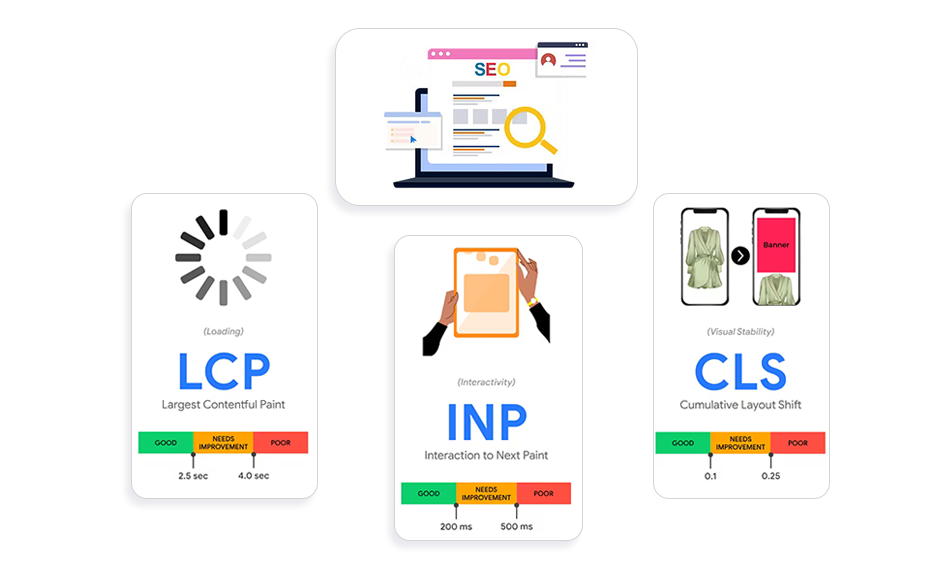
TL;DR: Core Web Vitals in 2026 are all about real user experience, not just speed. With INP replacing FID and Google relying more on real-world data, performance now directly impacts rankings. To improve core web vitals, focus on faster loading (LCP), smoother interactions (INP), and stable layouts (CLS). Don’t chase scores, optimize how your site actually feels to users.
Search rankings in 2026 are no longer shaped by content alone, they’re shaped by how users experience your site in real time. Pages that look fast in testing tools can still feel sluggish when people actually interact with them, and that gap is exactly what Google is now measuring. With stronger emphasis on page experience signals, performance has moved beyond load speed into responsiveness, stability, and usability at scale.
If you’re trying to improve core web vitals, the challenge today isn’t just technical, it’s behavioral. You need to understand how users engage with your pages, where delays happen, and what disrupts their experience. This guide breaks down the latest Core Web Vitals changes in 2026, what’s influencing rankings now, and how to improve website performance metrics with practical, real-world strategies that actually move the needle.
What Are Core Web Vitals in 2026?
Core Web Vitals are still built around three pillars:
These metrics are based on real user data (field data) from Chrome users, not just lab tests.
In simple terms:
- LCP = How fast your main content loads
- INP = How quickly your site responds to user actions
- CLS = How stable your layout feels
Core Web Vitals 2026 Changes: What’s Actually Different?
Core Web Vitals in 2026 go beyond load speed, focusing more on real user interactions, responsiveness, and overall page experience across the entire user journey.
1. INP Has Fully Replaced FID (And It’s Harder to Pass)
The biggest shift in core web vitals 2026 changes is the replacement of First Input Delay (FID) with Interaction to Next Paint (INP).
Unlike FID, which only measures the first interaction, INP evaluates every interaction on your page, clicks, taps, typing, and reports the slowest one. This makes it far more reflective of real-world performance.
That’s why:
- Around 43% of websites that previously passed FID now fail INP
- INP has become the most common performance bottleneck in 2026
Real insight:
Most websites were optimized for loading speed, not interaction responsiveness. That’s why many sites load fast but still feel slow when users try to interact.
2. Google Is Prioritizing Real User Experience (Not Lab Scores)
Google has shifted heavily toward real-world data instead of simulated lab performance.
Today, rankings are influenced by:
- Chrome UX Report (CrUX)
- Real user interaction data (field data)
- Mobile-first performance
This means:
- A PageSpeed score of 95+ doesn’t guarantee rankings
- Poor real-user experience can directly lead to ranking drops
Google ranks what users actually experience, not what your testing tools predict.
3. Stronger Impact of Page Experience Signals
The Google core web vitals update (2026) has significantly increased the importance of page experience signals SEO, especially in competitive search results.
- Only 47-48% of mobile websites and approximately 56% of desktop websites currently pass Core Web Vitals.
This is where core web vitals ranking factors matter most:
- Competitive keywords
- E-commerce pages
- High-intent landing pages
- In 2026, performance is no longer optional, it’s a competitive advantage.
4. Beyond CLS: The Rise of Advanced Visual Stability Metrics
A newer concept gaining traction in 2026 is the Visual Stability Index (VSI).
While CLS still measures layout shifts, VSI goes a step further by evaluating overall visual smoothness during page interactions, not just loading. This includes:
- Micro-layout shifts during scrolling
- Dynamic UI changes (menus, popups, sticky elements)
- Animation stability
Why it matters:
CLS alone doesn’t fully capture modern UX. VSI reflects how visually comfortable your site feels throughout the session, not just at load.
Although not yet an official ranking metric, VSI is increasingly being used in advanced performance audits and may influence future updates.
5. Performance Matters More for Rankings in 2026
The March 2026 Google Core Update (reported to have launched around March 27 with a gradual rollout) has reinforced the role of Core Web Vitals in rankings.
Previously, Core Web Vitals acted mostly as a tiebreaker:
- If two pages had similar content, the faster one ranked higher.
- In 2026, performance has evolved into a ranking filter:
- If your Core Web Vitals are poor, even high-quality content can struggle to rank.
Supporting data shows:
- Pages ranking in position #1 have ~10% higher Core Web Vitals pass rates compared to pages in position #9
What this means for you:
You can no longer rely on content alone. To consistently rank, you must improve Core Web Vitals alongside content quality.
Why Core Web Vitals Still Matter for SEO in 2026
Let’s be clear, Core Web Vitals are not the #1 ranking factor. High-quality, relevant content still drives visibility. But in 2026, performance plays a much bigger supporting role than it used to.
Core Web Vitals now influence how your content competes, not just whether it ranks.
They act as:
- A tie-breaker between pages with similar content quality
- A conversion multiplier, directly impacting engagement, bounce rate, and revenue
- A trust signal for AI-driven search systems that prioritize user satisfaction
In practical terms, if two pages answer the same query equally well, Google is far more likely to rank the one that loads faster, responds quicker, and feels stable during interaction.
More importantly, poor performance can quietly hold strong content back. A page with excellent information but frustrating UX, slow clicks, shifting layouts, and delayed responses can lose both rankings and users.
Think of it like this:
Good content gets you in the race. Core Web Vitals determine how far and how fast you go.
How to Improve Core Web Vitals (Step-by-Step)
Improving Core Web Vitals isn’t about quick fixes, it’s about identifying the exact bottlenecks affecting your site and applying targeted optimizations that enhance loading speed, responsiveness, and visual stability.
1. How to Improve LCP (Largest Contentful Paint)
LCP is often slow because of:
- Heavy images
- Slow servers
- Render-blocking CSS/JS
High-impact fixes:
- Use image preloading
- Implement lazy loading for below-the-fold content
- Use modern formats like WebP
- Optimize server response time (TTFB)
<link rel="preload" as="image" href="hero.webp">Pro tip:
In most audits, fixing just the hero image + server response improves LCP by 30–50%.
2. How to Optimize INP (Interaction to Next Paint)
This is where most sites struggle in 2026.
Common INP issues:
- Heavy JavaScript execution
- Too many third-party scripts
- Long main-thread blocking
Fixes that actually work:
- Break large JS bundles (code splitting)
- Defer non-critical scripts
- Reduce unused JavaScript
- Use event delegation instead of multiple listeners
Real-world insight:
Removing 5–10 unnecessary scripts often improves INP more than any advanced optimization.
3. How to Reduce CLS (Cumulative Layout Shift)
CLS is usually caused by:
- Images without dimensions
- Ads or dynamic elements
- Fonts loading late
Fixes:
<img src="image.jpg" width="600" height="400">- Reserve space for ads and embeds
- Use font-display: swap
- Avoid injecting content above existing elements
CLS is one of the easiest wins in core web vitals optimization.
Core Web Vitals Best Practices (That Actually Work in 2026)
Focus on real users, not just tools
Don’t rely only on Lighthouse scores. Use real-user (field) data to understand how your site actually performs in different conditions and devices.
Audit and reduce third-party scripts
Remove unnecessary trackers, widgets, and scripts. Each extra script adds load time and hurts responsiveness, especially INP.
Adopt a mobile-first performance approach
Optimize for slower devices and networks first. If your site performs well on mobile, desktop performance usually follows.
Build performance into your workflow
Treat Core Web Vitals optimization as an ongoing process, not a one-time task. Monitor changes after every update or deployment.
Track real-user data consistently
Review Core Web Vitals weekly using field data to catch issues early before they impact rankings or user experience.
Tools to Measure and Monitor Core Web Vitals
Google PageSpeed Insights
Combines lab and field data to show real-user performance along with actionable recommendations.
Chrome UX Report (CrUX)
Provides large-scale real-user data, helping you understand how your site performs across different users and regions.
Lighthouse
Ideal for debugging and testing in a controlled environment. Helps identify technical issues affecting performance.
Web Vitals Chrome Extension
Offers real-time Core Web Vitals data as you browse, making it useful for quick checks and audits.
Use a continuous monitoring setup
Implement a website speed optimization workflow or tool to track performance over time, detect regressions, and maintain consistent improvements.
Common Mistakes in Core Web Vitals Optimization
Many websites struggle with Core Web Vitals not because they ignore performance, but because they focus on the wrong priorities.
Mistake #1: Chasing a perfect PageSpeed score
A high score doesn’t always reflect real-user experience. Field data matters more than lab results.
Mistake #2: Ignoring INP
In 2026, responsiveness is critical. A fast-loading site can still feel slow if interactions lag.
Mistake #3: Overusing plugins and third-party scripts
More tools often mean more JavaScript, which negatively impacts performance.
Mistake #4: Skipping mobile optimization
Poor mobile performance can quietly hurt both rankings and user experience.
Mistake #5: Treating it as a one-time fix
Performance needs ongoing monitoring, small changes can quickly create new issues.
How Core Web Vitals Connect to Conversions
Here’s what I’ve seen consistently:
- Faster sites → lower bounce rates
- Better INP → higher engagement
- Stable layouts → more trust
Even a 1-second delay can significantly reduce conversions, especially in e-commerce.
That’s why improving page load speed is not just SEO, it’s revenue.
Conclusion
Core Web Vitals in 2026 are no longer just a technical SEO checklist, they represent how real users experience your website from the moment it loads to every interaction that follows. Google’s focus has clearly shifted from measuring speed alone to evaluating responsiveness and visual stability in real-world conditions.
If you want to improve core web vitals, the priority is simple: faster loading, smoother interactions, and stable layouts that don’t disrupt users. But more importantly, this requires a mindset shift. Instead of chasing scores or benchmarks, focus on how your site actually feels to use.
Because in 2026, rankings are no longer won by the fastest site on paper, they’re earned by the one that delivers the best real-world experience.
FAQs
1. What are the new core web vitals changes in 2026?
2. How can I improve core web vitals quickly?
- Optimize images (LCP)
- Reduce JavaScript (INP)
- Fix layout shifts (CLS)
3. Is Core Web Vitals still a ranking factor in 2026?
4. What is the most important Core Web Vital in 2026?
5. How often should I monitor Core Web Vitals?
6. Does website speed optimization still matter?
7. What is a good INP score in 2026?
8. Can Core Web Vitals impact conversions?
About the Author