






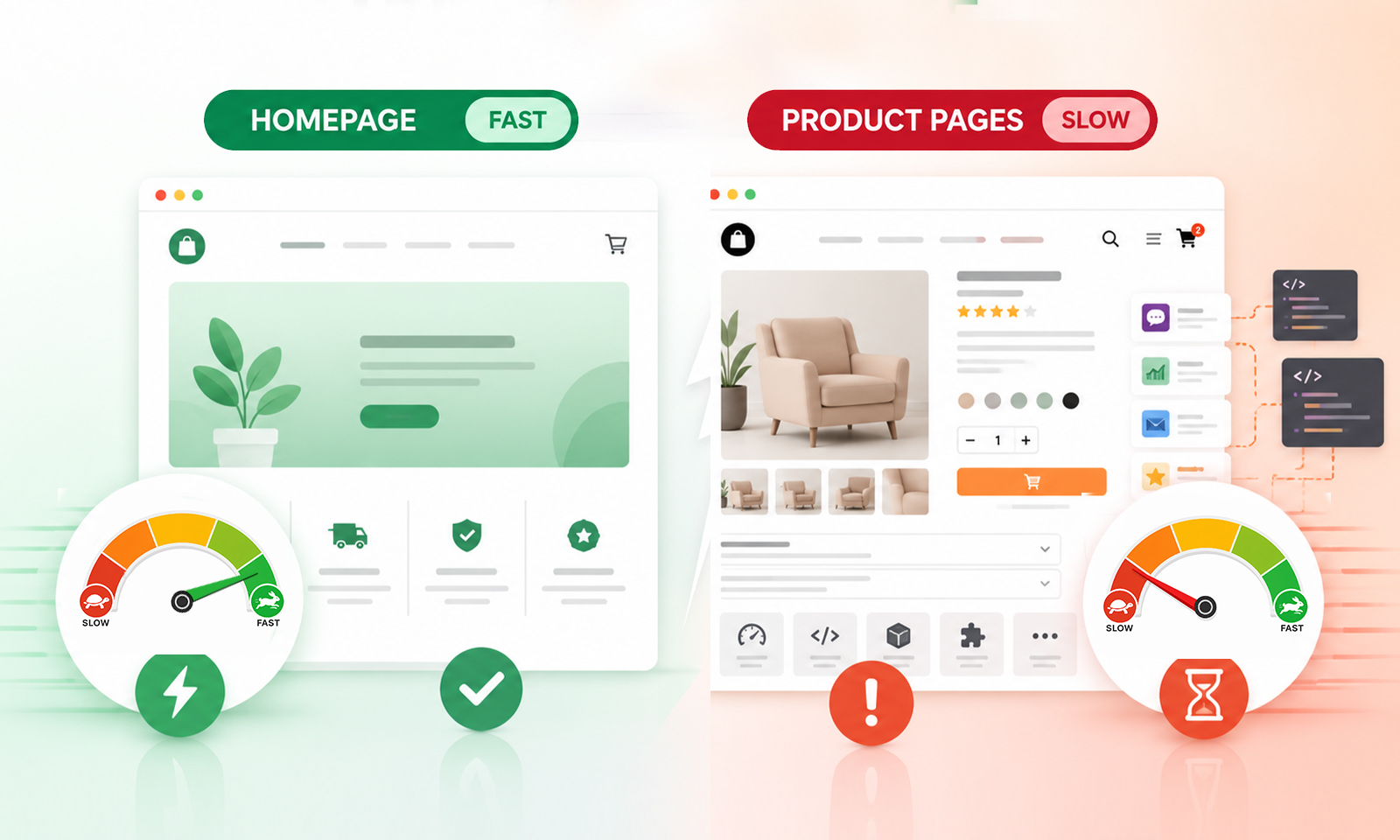
TL;DR: Your homepage can be fast while product pages are slow because product pages usually load more images, reviews, variants, apps, tracking scripts, and dynamic content. Compare the two page types in PageSpeed Insights and a waterfall report, then optimize the largest resources, JavaScript, server response, caching, and above-the-fold content.
It is common for an ecommerce site to have a fast homepage but surprisingly slow product pages. The homepage may load in a couple of seconds, while a product URL takes noticeably longer to become usable.
That does not necessarily mean your entire website has a speed problem. It usually means the two page types have very different workloads.
Product pages have more to do: load product imagery, display variants, fetch inventory, initialize reviews, run recommendation widgets, track user behavior, and sometimes connect to several third-party services. That makes product page speed a separate optimization problem.
Homepage Fast, Product Pages Slow: Why and What to Fix
A fast homepage does not mean every page is fast. Product pages are often slower because they carry more images, functionality, dynamic data, and third-party resources. Improving those areas is the most effective way to speed up product pages.
| What you’re seeing | Why it happens | What to do |
|---|---|---|
| Homepage loads fast | It may have fewer product-specific features and dynamic requests. | Keep non-essential content and scripts lightweight. |
| Product pages load slowly | They load product images, variants, reviews, recommendations, and apps. | Audit the product template and remove unnecessary resources. |
| Product page has high page weight | Multiple large images, videos, and assets add up quickly. | Resize, compress, and serve responsive images. |
| Product page feels slow after loading | JavaScript from variants, reviews, and widgets can delay interactions. | Remove, defer, or delay non-critical JavaScript. |
| Product page takes longer to start | Dynamic data, server processing, or caching can increase TTFB. | Check TTFB and improve caching and server response. |
| Product pages are slow on mobile | Heavy resources are more noticeable on slower networks and devices. | Prioritize above-the-fold content and defer lower-priority resources. |
Why Are Product Pages Heavy When Your Homepage Is Fast?
A homepage and a product page may share the same theme, hosting, CDN, and platform, but they rarely have the same workload.
Think of the homepage as a storefront window. It may display a few promotional images, navigation elements, and featured products. A product page, on the other hand, has to support the buying decision by loading product images, variants, pricing, reviews, recommendations, and other interactive elements.
That additional functionality can make product pages significantly heavier than the homepage. The issue is often not the platform itself, but how much content and functionality the product template asks the browser and server to process.
As a result, a fast homepage does not necessarily mean your product page performance is healthy. To understand the difference, it helps to look at what makes product pages heavier in the first place.
5 Common Reasons Your Product Pages Are Slower
Product pages often have a heavier technical workload than other pages on an ecommerce site. These five areas are the best places to investigate when product pages are slow, especially if the homepage performs well.
1. Product Images Can Add Significant Page Weight
Product pages typically contain far more visual content than homepages. Along with the main product image, shoppers may load multiple gallery images, alternate views, thumbnails, lifestyle photos, zoom images, videos, and recommendation images.
Individually, these assets may not seem large, but together they can significantly increase the amount of data the browser has to download. This is especially noticeable on mobile connections, where a heavier page can take longer to load visually.
What to do:
Resize images to their actual display dimensions, compress them appropriately, use responsive image sizes and modern formats such as WebP or AVIF where suitable. Prioritize the main product image when it contributes to LCP, and lazy-load images that appear below the initial viewport.
2. Product-Specific JavaScript Creates More Browser Work
A product page often needs functionality that a homepage does not. Variant selection, image galleries, reviews, wishlists, subscriptions, size guides, personalization, and recommendation tools can all add JavaScript.
The problem is not simply the number of scripts. The browser also has to parse, compile, and execute them. A page can therefore appear visually loaded while still feeling slow when shoppers try to select a variant, open a review section, or interact with other controls.
What to do:
Audit the scripts running on the product template, remove unnecessary ones, and defer or delay non-critical JavaScript so essential product content and interactions receive priority.
3. Third-Party Apps Add Requests Beyond the Core Store
Ecommerce stores often rely on several external services to add functionality. Reviews, analytics, chat, personalization, advertising, loyalty programs, and product recommendations may each connect to third-party domains.
These services can introduce additional network requests and browser processing. Some may also load resources before the shopper actually needs the feature, allowing secondary functionality to compete with the product content that matters most.
What to do:
Identify third-party resources in a waterfall report and evaluate their contribution to the product experience. Keep essential integrations, but delay non-critical services until after the main product content has loaded.
4. Dynamic Product Data Can Slow the Initial Response
A product page is not always a simple collection of static files. Depending on the ecommerce platform and setup, the server may need to handle product information, inventory, pricing, variants, recommendations, personalization, or API requests.
If server-side processing or critical API requests take too long, they can delay the initial response or the rendering of important product content. This can make the product page load time feel slow even when the images and front-end code are well optimized.
What to do:
Check TTFB alongside front-end metrics. If server response is causing the delay, investigate caching, backend processing, API calls, database operations, and hosting or infrastructure limitations.
5. A Complex Product Template Can Increase Browser Work
Product pages can accumulate a surprising amount of markup over time. Product galleries, accordions, reviews, recommendation carousels, sticky purchase bars, popups, size guides, and hidden sections can all contribute to a larger DOM and more complex rendering.
This does not mean every large DOM is automatically a performance problem. The bigger issue is unnecessary complexity that makes the browser process elements shoppers may never see or use.
What to do:
Review the product template for unnecessary sections, duplicated components, excessive nesting, and widgets with little value. Simplify the structure where possible and keep the initial viewport focused on essential information such as the product image, title, price, options, availability, and purchase action.
How to Diagnose a Slow Product Page
Do not compare only the homepage and product page performance scores. Compare their Core Web Vitals, server response, resource loading, and waterfall behavior to see what is actually slowing the product page down.
Start by testing a representative homepage and product URL in Google PageSpeed Insights. PSI combines Lighthouse lab analysis with real-user CrUX data when available, so the two datasets can reveal different problems. Then compare:
| What to check | Homepage | Product page |
|---|---|---|
| Total page weight | Lower | Often higher |
| Image requests | Fewer | Often numerous |
| JavaScript | Usually moderate | Often heavier |
| Third-party apps | Limited | Frequently higher |
| Dynamic requests | Fewer | More common |
| DOM complexity | Lower | Often higher |
| LCP | Compare directly | Often affected by product imagery |
| INP | Compare directly | Can suffer from interactive scripts |
A waterfall view is particularly useful because it shows what actually happens first, second, and third.
Instead of guessing that images are responsible, you can identify whether the bottleneck is an image, JavaScript file, API request, third-party domain, or server response. You can also compare lab and real-user results using Google’s PageSpeed Insights documentation.
How to Improve Product Page Speed
Effective product page optimization is usually about removing unnecessary work rather than making every element load faster.
Optimize the product image pipeline
Resize oversized originals, compress images, use responsive variants, and select appropriate formats. Keep the main product image high priority when it is part of the initial viewport, while lazy-loading images farther down the page.
Reduce unnecessary JavaScript
Audit apps and scripts individually. If a script does not contribute to the product
experience or business goal, remove it. For non-critical scripts, use appropriate loading
strategies such as defer or delayed execution.
For example:
<script src="reviews.js" defer></script>
defer allows the browser to continue parsing the document instead of immediately
blocking HTML parsing for the script.
Improve caching and delivery
Cache resources that do not need to be regenerated for every request. Use a CDN where appropriate and make sure static assets have sensible cache policies.
A warm-up cache request can also be relevant when your performance issue involves cold-cache behavior.
Prioritize the critical product content
Your browser should not spend its earliest resources loading a recommendation carousel that appears near the bottom of the page.
Prioritize the product title, main image, price, variants, availability, and purchase controls. Resource prioritization is particularly important when many assets compete for bandwidth.
Check Core Web Vitals
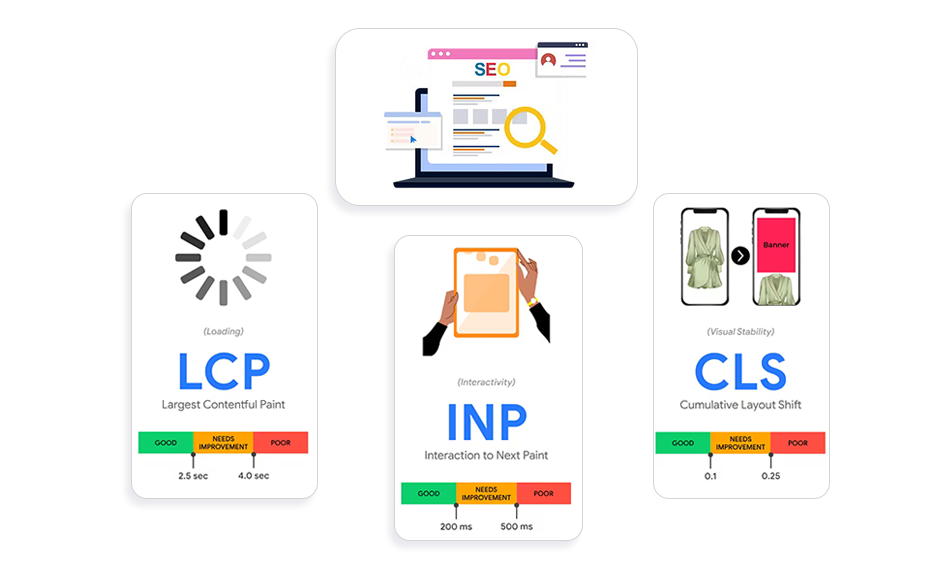
Google recommends aiming for LCP within 2.5 seconds, INP below 200 milliseconds, and CLS below 0.1 for a good user experience.
These metrics are more useful than obsessing over a single speed score because they show different aspects of product page performance: loading, responsiveness, and visual stability.
You can also compare INP vs. LCP vs. CLS to understand which part of the product experience needs attention.
Does Product Page Speed Affect SEO and Conversions?
Yes, but not simply because Google assigns a ranking boost for having a high PageSpeed score. Core Web Vitals are part of Google’s page experience considerations, but good scores alone do not guarantee higher rankings. Page experience is broader than a single performance metric.
For ecommerce businesses, the commercial impact can be even more direct. A shopper who waits for product imagery, pricing, reviews, or variant controls to become usable is more likely to encounter friction before purchasing.
That is why page speed matters beyond SEO. Better ecommerce product page speed supports a smoother product discovery and purchase experience.
Conclusion
A fast homepage does not mean your ecommerce site has solved product page speed.
Product pages are often more complex because they need to support product-specific content and shopping interactions. Large product images, JavaScript-heavy features, third-party apps, dynamic data, and complex layouts can all increase product page load time.
The best approach is to compare the homepage and product template at the resource level, identify the biggest bottleneck, and optimize what actually affects the shopper’s experience. When you focus on critical content, efficient assets, responsive interactions, and real-user data, you can improve product page speed without stripping away the features that make an ecommerce store useful.
FAQs
Why is my homepage fast but my product pages are slow?
Product pages usually load more images, JavaScript, dynamic product data, reviews, recommendation widgets, and third-party applications. The additional resources increase both network and browser processing work.
What is a good product page load time?
There is no single universal product page load time that guarantees a good experience. Instead, focus on Core Web Vitals and real-user performance. Google recommends LCP of 2.5 seconds or less, INP below 200 ms, and CLS below 0.1.
How can I improve product page speed?
Start with the largest contributors: product images, JavaScript, third-party apps, server response time, caching, and unnecessary page elements. Test before and after each major change so you know what actually helped.
Why is my product page slow even after image optimization?
Images may not be the main bottleneck. Heavy JavaScript, third-party scripts, slow server response, API calls, or excessive DOM complexity can still make slow product pages feel sluggish.
Should I lazy-load product images?
Generally, images below the initial viewport are good candidates for lazy loading. The primary product image that contributes to LCP should usually be prioritized instead of being unnecessarily delayed.
Does a high PageSpeed score mean my product page is fast?
Not necessarily. PageSpeed Insights includes both lab and field data, and lab results can differ from real-user experiences. Always consider CrUX data, Core Web Vitals, and waterfall behavior when diagnosing product page speed.
About the Author