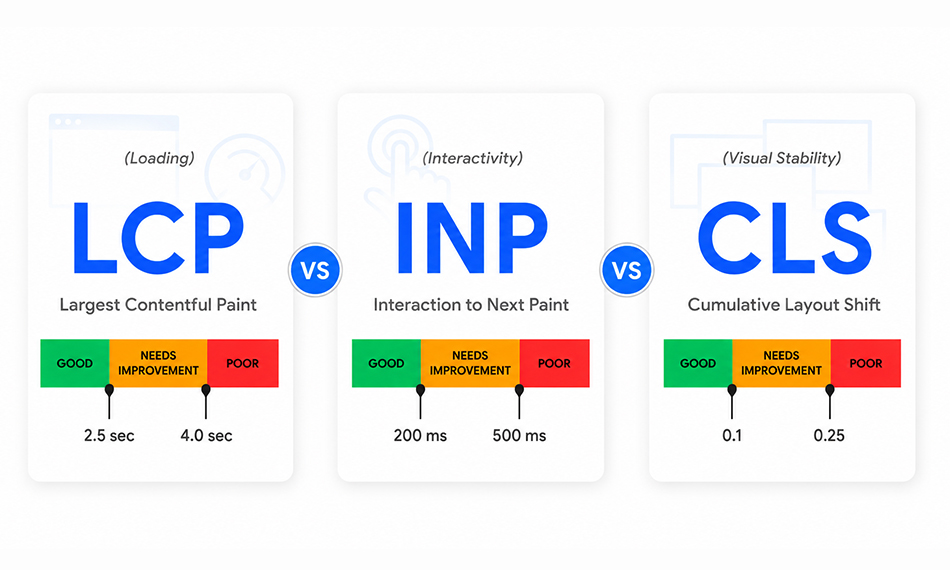
TL;DR: LCP, INP, and CLS measure three different parts of website experience: loading speed, interaction responsiveness, and visual stability. While all three Core Web Vitals matter for SEO and usability, LCP is usually the best starting point. Websites that improve these metrics consistently tend to see better engagement, lower bounce rates, and stronger search performance.
Google’s Core Web Vitals (LCP, INP, and CLS) are the official performance metrics Google uses to evaluate real-world page experience. But when developers ask about INP vs LCP vs CLS, which is most important, there isn’t a single metric that matters more in every situation. Each metric measures a completely different dimension of the user experience, and all three feed directly into Google’s page experience signals.
Below is a breakdown of what each Core Web Vital measures, how each one affects real website speed and Google rankings, which metric most sites fail, and exactly what to fix first.
Why Website Speed Depends on LCP, INP, and CLS
Most developers think of website speed as load time, the number of seconds before a page appears. That’s one part of it. But users don’t experience speed in a single moment. They experience it across three separate points: when the page first shows them something useful, when they interact with it, and whether the layout holds still throughout.
Google created Core Web Vitals because each of these points requires its own measurement. A page can be perfectly fast on the first two and completely broken on the third. Fixing only LCP while ignoring INP and CLS is like fixing the front door of a house while leaving the windows broken.
How Each Core Web Vital Connects to Website Speed

Core Web Vitals reveal how users actually experience a website’s speed, how quickly pages become usable, responsive, and visually stable during real interactions.
LCP: Loading Speed
Direct impact. Controls how fast the main content becomes visible. A slow LCP makes the entire page feel broken before anything else loads.
INP: Interaction Speed
Post-load impact. The page may load fast, but feel completely sluggish if tapping a button or opening a menu takes 400ms to register.
CLS: Visual Stability
Unexpected layout shifts make pages feel unreliable and harder to use, especially on mobile devices, where even small movements can disrupt interactions.
A URL must pass all three thresholds to be rated “Good” in Google Search Console, failing even one drops the entire page to the status of its worst metric.
LCP: The Metric Most Directly Tied to Website Speed
Largest Contentful Paint marks the exact moment when the largest visible element in the viewport, typically a hero image, a large heading, or a video poster, finishes rendering on screen.
When LCP is slow, users see a blank or partially-loaded screen for several seconds. There is no clearer signal of a slow website. 53% of mobile users abandon a page that takes longer than three seconds to load, and a poor LCP score is the most common reason pages cross that threshold. It is the metric where speed perception begins, which is exactly why fixing it has the highest immediate impact.
Only 62% of mobile pages achieve a good LCP score, making it the hardest Core Web Vital to pass across the web.
Common Causes of Poor LCP Scores
The most common culprits are unoptimized hero images still being served as PNG or JPEG, render-blocking JavaScript and CSS loaded before the LCP element, slow server response times (TTFB above 800ms), and no CDN for geographically distributed visitors. Sites serving large images without WebP or AVIF conversion are frequently losing 400-800ms on that single issue alone.
Highest-ROI LCP Fix
- Convert hero images to WebP or AVIF and compress to the exact display dimensions
-
Add
fetchpriority="high"andloading="eager"to the LCP image, avoid lazy loading your primary LCP image. -
Eliminate render-blocking scripts in the
<head>– defer or async everything non-critical - Reduce Time to First Byte (TTFB) to under 800ms using server-side caching or a CDN
- Switch to server-side rendering (SSR) or static generation (SSG) to avoid client-side JS hydration delays on the LCP element
INP: Why Fast Pages Can Still Feel Slow
In March 2024, Google replaced First Input Delay (FID) with Interaction to Next Paint INP as a Core Web Vital. FID only measured the delay on a user’s very first interaction. A site could score perfectly on FID while becoming completely unresponsive on every subsequent click, every dropdown, every form field, every “Add to Cart.” INP eliminates that blind spot.
INP measures the 95th percentile of all interaction latencies across the entire page session, clicks, taps, and keyboard inputs included. If a page has 100 user interactions and the 95th slowest takes 600ms to produce a visible response, that is the INP score. This makes it a far more accurate signal of how a website actually feels during real use.
How INP Affects User Experience After Load
Here is the scenario INP catches that no previous metric did: a user lands on a product page. LCP is a clean 1.9 seconds. They tap the color selector, and nothing happens for 450ms. They click “Add to Cart”, and the button shows no response for 380ms. The page loaded fast. It does not feel fast. That gap between load speed and interaction speed is exactly what INP was built to measure and what Google now uses as a ranking signal.
77% of mobile pages currently pass INP, a better average than LCP. But this hides serious problems on JavaScript-heavy sites. Complex single-page applications, e-commerce stores with dynamic filtering, and news sites running heavy ad stacks frequently fail INP even when LCP looks clean. The more interactive a page is, the harder INP becomes to pass.
Best Ways to Improve INP
- Break long JavaScript tasks (>50ms) into smaller chunks using setTimeout or the scheduler.postTask() API
- Move heavy computation off the main thread using Web Workers
- Audit all third-party scripts because ad libraries, chat widgets, and analytics tags are common INP killers.
- Use Chrome DevTools Performance panel to identify which specific interactions cause delays
- Reduce total JavaScript bundle size, every KB of parsed JS adds to main-thread blocking time
CLS: Why Visual Stability Still Affects Speed Perception
Cumulative Layout Shift scores the total amount of unexpected visual movement across the entire page lifetime. When an ad loads and pushes the article text 300px down, when a late-loading font causes a heading to reflow and shift a button out of position, or when a lazy-loaded image appears without reserved space, all of these shifts contribute to the overall CLS score. The calculation combines two factors: the size of the shifting elements relative to the viewport (impact fraction) and the distance they move (distance fraction).
Why CLS Still Impacts Website Speed Perception
CLS has almost nothing to do with raw load time. But it has everything to do with whether a page feels fast and reliable. A layout that keeps moving forces users to re-read content, re-locate buttons, and sometimes accidentally tap something completely different. That friction registers as slowness even when the clock says the page loaded in 1.4 seconds.
Poor CLS directly inflates bounce rates because users interpret a shifting layout as a broken or low-quality page, even when everything is technically working. Yahoo! JAPAN resolved a major CLS issue in 2024 and recorded a 15.1% increase in page views per session and a 1.72% drop in bounce rate from that single fix.
Best Ways to Improve CLS
- Add explicit width and height attributes to every
<img>,<video>, and<iframe>element - Reserve space for ads and embeds using CSS aspect-ratio or a min-height container before they load
- Preload critical fonts and use font-display: optional to prevent late font swaps from reflowing text
- Never inject new content above existing page elements after the initial load completes
- Use CSS contain: layout on dynamically updating components to isolate their reflow impact from the rest of the page
INP vs LCP vs CLS Comparison
The comparison below breaks down what each metric measures, how it affects perceived speed, and the primary optimizations used to improve it.
How to Improve INP, LCP, and CLS Together In the Right Order
Fixing Core Web Vitals effectively means prioritizing the right factors first:
1. Audit – Identify What’s Actually Failing
Run the top 10 highest-traffic URLs through PageSpeed Insights and pull the Core Web Vitals report from Google Search Console. Note which metric is rated “Poor” on the most pages. Field data in Search Console is what Google sees – prioritize fixing what’s failing there, not just what Lighthouse flags in lab mode.
2. LCP – Compress, Prioritize, and Serve Faster
Convert all hero images to WebP or AVIF and size them to the exact display dimensions. Add fetchpriority="high" to the LCP element. Audit the
3. CLS – Reserve Space, Fix Fonts, Stabilize Ads
Add explicit width and height to every image and media element. Wrap ad slots in fixed-size containers with min-height. Preload critical fonts and use font-display: optional to prevent text reflow after load. Test specifically on mobile, CLS issues that go unnoticed on desktop are often severe on smaller viewports, where the impact fraction is larger.
4. INP – Profile Interactions, Break Tasks, Trim JS
Open Chrome DevTools Performance panel and reproduce the specific interactions flagged in the field data. Look for Long Animation Frames exceeding 50ms. Break heavy tasks using scheduler.postTask(). Audit every third-party script, remove what isn’t essential, defer the rest until after the page is fully interactive. Each KB removed from the JS bundle directly reduces main-thread contention.
5. Monitor Continuously – CWVs Can Regress Overnight
Core Web Vitals fluctuate with code deployments, new ad tags, and third-party script updates. A single new analytics library added without a performance review can undo months of INP work. Set up weekly Search Console monitoring, implement schema markup to improve CTR alongside performance, and treat CWV as an ongoing process.
Final Thoughts
Core Web Vitals have become a core part of modern website performance, shaping both user experience and search visibility. LCP, INP, and CLS each measure a different aspect of how fast, responsive, and stable a page feels in real-world conditions. While LCP is often the best starting point for optimization, long-term improvements come from balancing all three metrics together. As Google continues prioritizing page experience, faster and more stable websites will continue to hold a clear advantage in rankings and engagement.
Frequently Asked Questions
Which Core Web Vital is most important for website speed?
Is INP more important than LCP?
Does CLS affect website speed?
Which Core Web Vital should I fix first?
How can I improve INP, LCP, and CLS together?
About the Author