






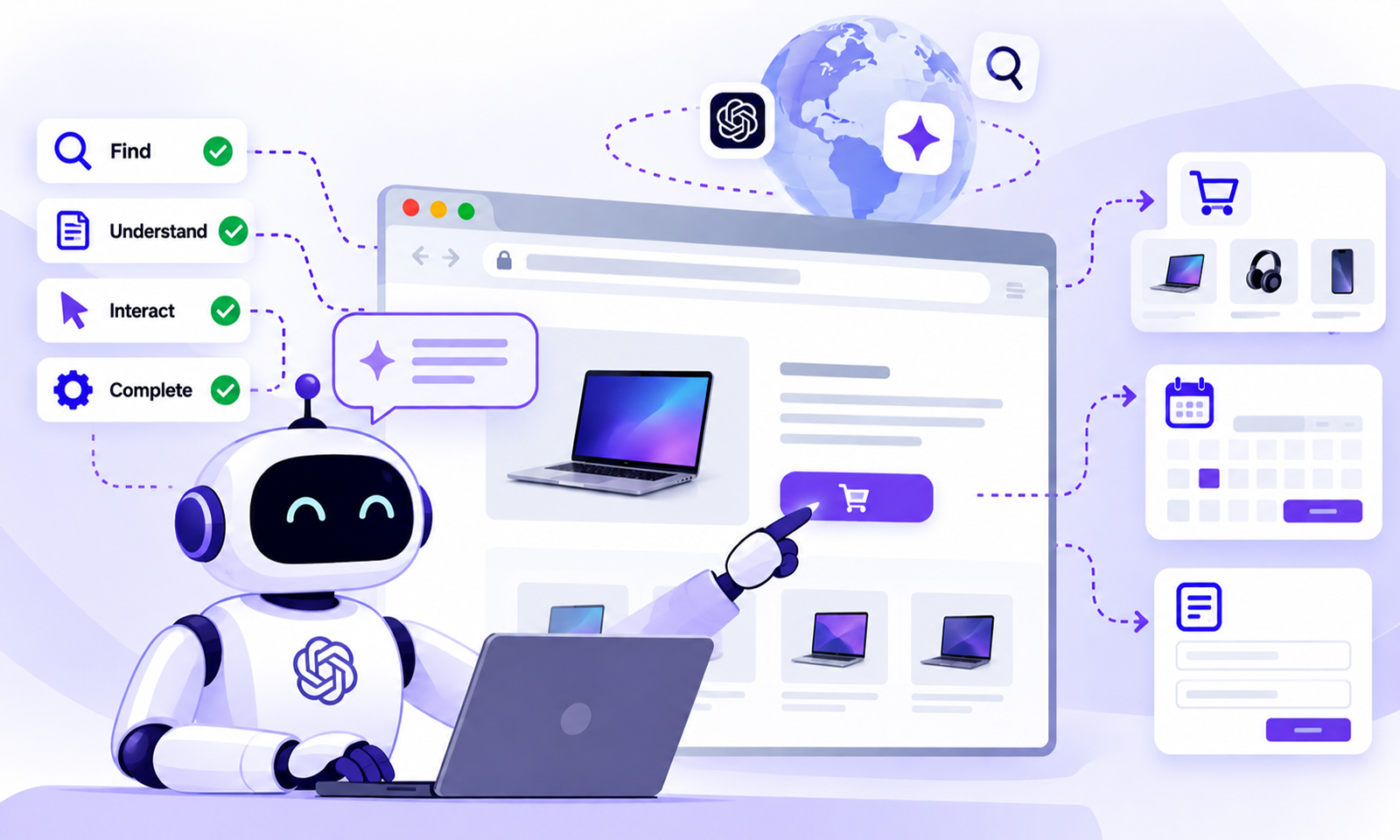
TL;DR: Agentic browsing is when AI agents use a web browser to understand websites, navigate pages, interact with elements, and complete tasks for users. For website owners, this means websites need to be not only searchable, but also accessible, fast, predictable, and usable by AI agents.
The way people use the web is changing. Instead of searching for a website, opening several pages, and completing every step themselves, users can increasingly ask an AI assistant to perform tasks on their behalf. That shift is driving agentic browsing.
An AI agent can navigate a website, interpret its content, interact with forms and buttons, and potentially complete multi-step tasks. For website owners, the important question is no longer just whether search engines can discover a site. It is whether AI agents can successfully understand and use it.
Agentic Browsing at a Glance
- Agentic browsing is when AI agents use a browser to navigate websites, understand content, and complete tasks for users.
- Unlike AI search, it allows agents to interact with webpages, including clicking links, filling forms, and completing multi-step actions.
- AI browser agents can interpret a user’s goal and decide what actions to take rather than simply following a fixed browsing path.
- For website owners, clear content, accessible interfaces, reliable interactions, and strong performance can make websites easier for AI agents to use.
- Agentic browsing typically goes beyond fixed browser automation because the agent can interpret the current page, user goal, and task state to decide what to do next.
What Is Agentic Browsing?
Agentic browsing is when an AI agent uses a web browser to understand websites and carry out tasks for a user. Instead of a person handling every step, the agent can navigate pages, interact with website elements, and respond based on what it finds.
With traditional browsing, the user decides where to go, what to click, what to enter, and how to interpret the results. With agentic browsing, an AI system can take on some of those decisions and actions based on the user’s goal.
For example, a user might ask:
“Find a laptop under $1,000 with at least 16 GB of RAM and compare three options.”
Instead of simply returning search results, an AI agent could visit ecommerce websites, inspect product information, filter options, compare specifications, and return the results. In a more advanced workflow, the agent could interact with a website’s search, cart, booking, or checkout functionality.
Chrome’s documentation describes this broader shift as moving from agents that search the web toward agents that can actually use the web. That distinction is important for website owners.
How Does Agentic Browsing Work?
At a basic level, how AI agents browse websites looks similar to human browsing, but the decision-making happens through an AI system.
An agent may:
1. Receive a user’s goal.
2. Open or locate relevant websites.
3. Inspect page content and available interface elements.
4. Determine what action should happen next.
5. Interact with links, buttons, forms, or other controls.
6. Check the result.
7. Continue until the task is completed or it needs human input.
This is different from a conventional crawler that primarily retrieves pages for indexing.
It is also different from simple browser automation. A scripted automation might always click the same button in the same sequence. An autonomous AI agent can interpret the current state of a page and adjust its actions according to the user’s goal.
Modern browser tooling is increasingly designed around this type of interaction. Chrome’s WebMCP documentation, for example, describes a proposed web standard that allows websites to expose structured tools that AI agents can use instead of relying entirely on simulated mouse clicks and keyboard input.
Agentic Browsing vs. Traditional Web Browsing
The easiest way to understand agentic web browsing is to compare it with the experience people already know.
| Traditional browsing | Agentic browsing |
|---|---|
| Human interprets the page | AI interprets the page |
| Human decides what to click | Agent decides the next action |
| Human fills out forms | Agent may fill forms |
| Human checks results | Agent can evaluate results |
| Usually one task at a time | Can coordinate multi-step tasks |
| Interface designed primarily for people | Interface may also need to work well for AI agents |
This does not mean humans disappear from the process. Depending on the application, users may still need to approve sensitive actions such as purchases, bookings, payments, or account changes.
That human-in-the-loop model is particularly important when an agent can perform consequential actions.
What Are AI Browser Agents?
AI browser agents are AI systems capable of operating within a browser environment to accomplish tasks.
They may combine language models with browser controls, page understanding, structured tools, and other capabilities. Some can inspect a page and interact with it directly; others can use structured interfaces exposed specifically for agents.
This is why terms such as AI web browsing, AI-powered browsers, web browsing agents, and autonomous web browsing are increasingly connected.
The underlying idea is simple: the browser becomes more than a window for viewing websites. It becomes an environment where an AI assistant can perform work.
Chrome’s current developer tooling also allows AI agents to connect to and inspect live browser sessions, illustrating how browser interaction is becoming part of agent workflows.
Why Does Agentic Browsing Matter to Website Owners?
For website owners, the biggest change is the definition of a good user experience. A website can look excellent to a human and still create problems for an AI agent.
SEO still helps AI systems discover and understand your website. Agentic browsing adds another step: once an agent reaches your site, it also needs to understand the interface and successfully complete the task.
Consider an ecommerce store where the product price is visible, but important information is loaded only after several JavaScript interactions. A human may understand what to do immediately. An agent may have more difficulty determining which elements matter or how to trigger the required interaction.
The same applies to:
-
complicated navigation
-
unclear buttons and labels
-
inaccessible form fields
-
unexpected pop-ups
-
broken interactions
-
slow page responses
-
content that depends heavily on client-side rendering
This makes semantic HTML, accessible interfaces, and machine-readable page structure increasingly relevant to agentic browsing alongside conventional accessibility, usability, SEO, and performance.
For context, Google’s Chrome team describes agent-friendly websites as websites designed thoughtfully for AI agents and provides WebMCP as one way to expose structured interactions.
How to Optimize Websites for AI Agents
There is no single “agentic SEO” checklist that guarantees an AI agent will use your website. Instead, focus on making the website easy to understand and reliable to operate.
1. Keep Important Information Clear and Accessible
Product names, prices, availability, descriptions, contact information, navigation labels, and other important content should be presented clearly in the page experience. Avoid making essential information unnecessarily dependent on obscure interactions.
This also overlaps with good SEO and accessibility practices. If an important piece of information is difficult for humans to locate or understand, it is unlikely to become easier for an AI agent.
2. Make Interactions Predictable
Buttons should behave like buttons. Forms should have clear labels. Links should describe their destinations. An agent needs to determine what an interface element does before deciding whether to use it.
This becomes especially important for ecommerce sites and applications with multi-step workflows such as search, filtering, account creation, booking, and checkout.
3. Pay Attention to Website Performance
Performance is not the same thing as agent readiness, but it can affect the quality of an agent’s interaction with a site.
Slow navigation, delayed content, excessive JavaScript, layout shifts, and long interaction times can make a website harder to use reliably.
You can also use Google PageSpeed Insights to evaluate performance issues from Google’s testing perspective.
4. Make Mobile Experiences Reliable
AI agents may encounter websites through different viewport sizes and browser environments. A site that works well on desktop but breaks on mobile creates another potential failure point.
Responsive layouts, usable controls, appropriate touch targets, and stable page structure remain important.
Issues such as poor mobile performance are particularly relevant for ecommerce websites, where a user may ask an AI assistant to find a product and then interact with the store.
5. Consider Structured Agent Interfaces
This is where newer technologies such as WebMCP become relevant.
WebMCP is a proposed web standard that allows websites to expose structured tools to AI agents through the browser. Instead of an agent guessing which button to click, a website can explicitly describe an available action, its inputs, and what it does.
For example, a booking website could expose an action such as:
The important point is not that every website needs to implement WebMCP today. The technology is still evolving. The broader lesson is that websites are beginning to provide machine-readable ways for agents to understand and perform actions.
6. Protect Sensitive Actions
Not every website action should happen automatically. Purchases, payments, account changes, bookings, and access to private information should have appropriate authentication, validation, and user confirmation. This becomes especially important when an AI agent can act on a user’s behalf.
Does Website Speed Affect Agentic Browsing?
Yes, it can. Agentic browsing depends on a sequence of interactions. If every page transition, script execution, or interaction takes longer than expected, the overall task can become slower and less reliable. That makes basic website performance worthwhile even when your primary goal is not AI.
For example, reducing unnecessary JavaScript can improve responsiveness. It is useful when interaction delays are caused by heavy client-side processing.
Likewise, a page can have a strong lab score and still feel slow to real users. This is why synthetic scores should not be treated as the complete picture.
The practical approach is straightforward: make pages load efficiently, respond predictably, and avoid unnecessary complexity.
Agentic Browsing Is Not the Same as AI Crawling
These concepts are related, but they should not be confused.
AI crawlers generally discover and retrieve website content so an AI system can process it. Agentic browsing goes further by allowing an AI system to interact with the website.
For example:
AI crawling:
“Find and retrieve this product page.”
Agentic browsing:
“Find this product, select the right size, add it to the cart, and tell me the final price.”
That difference is why website owners should think beyond content discoverability. Your website needs to be understandable and usable, not merely crawlable.
What Should Website Owners Do Now?
You do not need to rebuild your website around AI agents overnight. Start with the fundamentals.
First, test important user journeys. Search, product discovery, navigation, forms, login, checkout, booking, and other critical workflows should work consistently.
Second, review performance. Look at Core Web Vitals,, JavaScript execution, page weight, and real-user experience rather than relying on one score.
Third, check accessibility and semantics. Clear headings, labels, links, buttons, and form controls help both people and machines understand the interface.
Fourth, monitor emerging standards. Technologies such as WebMCP are evolving quickly, and their adoption will determine how websites expose capabilities to browser-based agents.
Finally, test agent interactions separately from SEO. A page can be perfectly indexable while still being difficult for an AI agent to operate.
For more advanced testing, Chrome now provides a Lighthouse Agentic browsing category that checks signals related to machine interaction, including accessibility, page stability, and WebMCP integration.
Conclusion
Agentic browsing represents a shift from AI systems that primarily read the web to AI agents that can increasingly use the web.
For website owners, the goal is not to create a completely separate website for AI. It is to build web experiences that are clear, accessible, fast, predictable, and easy for both people and agents to use.
SEO still matters for discovery. Performance still matters for usability. Accessibility still matters for people. And as AI agents become more capable, these same fundamentals increasingly matter for machines acting on behalf of users.
The most future-ready agent-friendly websites will be the ones that treat AI interaction as an extension of good web development, not as a replacement for it.
Frequently Asked Questions
What is agentic browsing in simple terms?
How is agentic browsing different from AI search?
What are AI browser agents?
How can I optimize my website for AI agents?
Does website speed matter for AI agents?
Is WebMCP the same as agentic browsing?
About the Author