






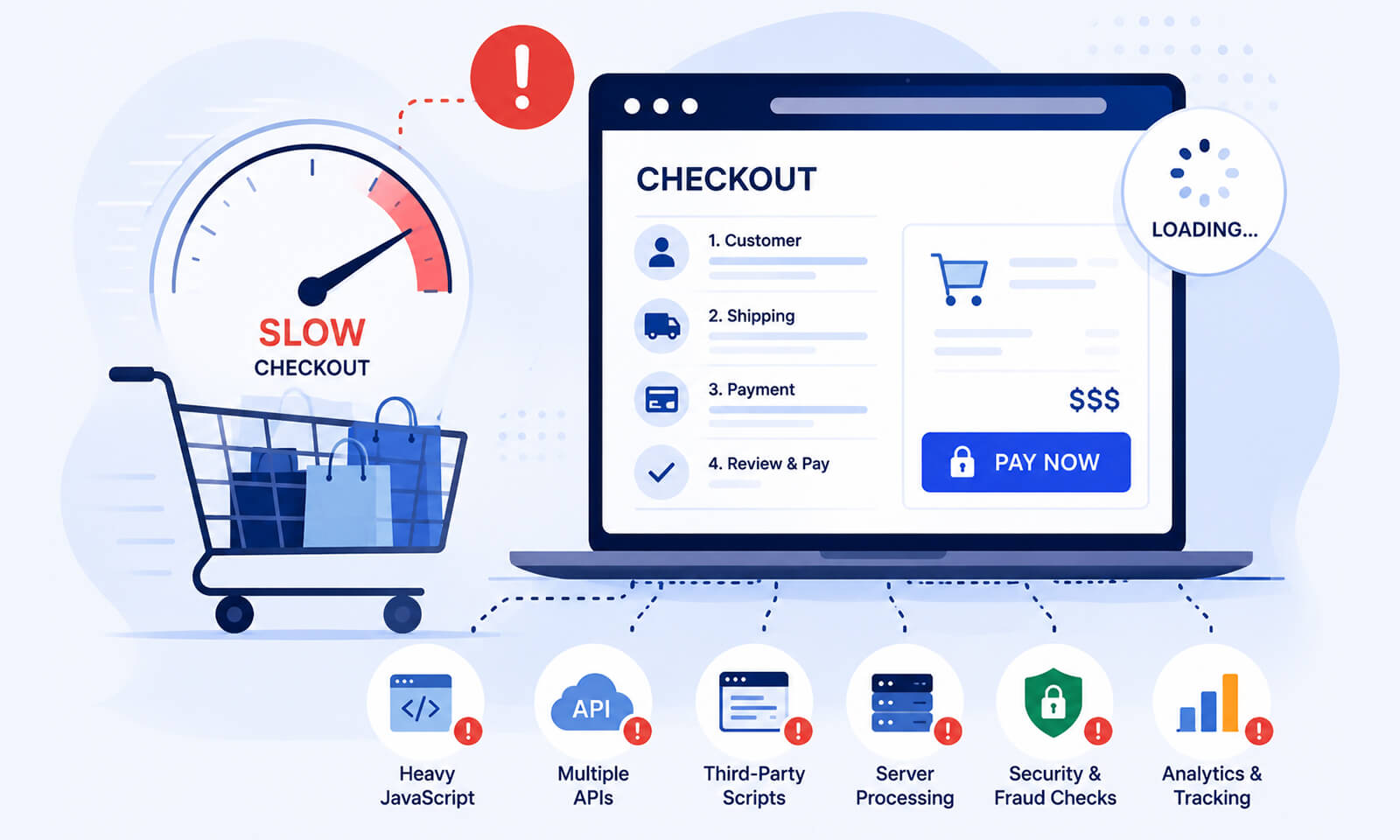
TL;DR: Your checkout page is often slower because it handles more dynamic functionality than other pages. Payment gateways, fraud detection, analytics, shipping APIs, personalization, and third-party scripts can increase requests, JavaScript execution, and server processing. Improving checkout page speed starts with identifying which resources actually delay loading and interaction, then removing, deferring, or optimizing anything that is not essential to completing the purchase.
A product page can feel fast while the checkout page takes noticeably longer to load. That is not unusual.
Checkout is usually one of the most technically demanding parts of an ecommerce website. It has to validate customer information, calculate shipping and taxes, process discounts, communicate with payment providers, and often run several security and tracking services.
So when your checkout page is loading slowly, optimizing images alone is unlikely to solve the problem. You need to look at the entire checkout request chain.
Quick Answer: Why Is the Checkout Page Slower?
Your checkout page is often slower because it handles more dynamic processes than other pages, including payment, shipping, tax, validation, and third-party services. These extra requests and JavaScript can increase checkout load time even when the rest of your website feels fast.
| What you’re seeing | Why it happens | What to check |
|---|---|---|
| Checkout loads slower than product pages | More APIs, scripts, and dynamic content are involved | Network requests and server response time |
| Checkout feels slow after loading | Heavy JavaScript delays interactions | Long tasks, INP, script execution |
| Payment or shipping takes time | External services must respond | API and third-party request timing |
| Speed score is low | Checkout has high page weight or blocking resources | Waterfall, JavaScript, and payload size |
| Checkout is slow only sometimes | Third-party or backend response times vary | Real-user data and repeated tests |
Common Reasons That Affect Checkout Page Performance
The biggest difference is that a checkout page is not simply displaying content. It is coordinating multiple systems while the customer is trying to complete a transaction.
A typical ecommerce checkout may communicate with payment processors, tax services, shipping providers, inventory systems, fraud prevention tools, analytics platforms, customer accounts, and promotional systems.
That makes checkout speed fundamentally different from the speed of a mostly static content page.
1. Checkout Uses More Third-Party Scripts
Third-party scripts are one of the first places to investigate when your checkout page performance is poor.
Analytics, advertising attribution, chat, customer behavior tracking, fraud detection, reviews, personalization, and payment-related services can all introduce additional network requests and JavaScript execution.
Google’s web performance guidance notes that third-party JavaScript can increase network overhead, consume main-thread time, and delay rendering when it is loaded inefficiently.
The problem becomes more noticeable on checkout because even a small amount of unnecessary work can compete with scripts that are essential to the purchase flow.
For example, if a marketing script is not needed until after checkout has become usable, loading it at the same priority as payment functionality makes little sense.
A practical first step is to audit which third-party resources actually load on checkout and determine whether each one is necessary.
2. The Checkout Has a Larger Page Weight Than You Think
Images are not always the main reason for a slow checkout page.
Checkout interfaces can accumulate JavaScript bundles, CSS, fonts, icons, payment widgets, tracking code, recommendation components, and dynamically generated content. All of these contribute to page weight.
A heavier page requires more data to download and more work for the browser to process. That is why understanding web page weight is useful when investigating checkout load time. Instead of asking only, “How many images are on the page?”, ask:
How many bytes are being transferred, how many requests are being made, and how much JavaScript must the browser execute before the checkout becomes usable?
3. Payment, Shipping, and Tax APIs Add Waiting Time
Checkout performance isn’t limited to the initial page load. A checkout can appear quickly but still feel slow when shoppers enter their address, apply a discount, select shipping, or switch payment methods. These interactions can trigger API calls and JavaScript work, so measure the complete checkout flow, not just the time until the page first appears.
These operations can create sequential dependencies.
For example:
Customer enters address → shipping API responds → total updates → tax calculation runs → checkout becomes ready
If each step waits for the previous one, the checkout can feel slow even when the initial page load is reasonably fast.
This is one reason checkout performance should be measured as a complete user flow rather than judged solely by the initial page-load score.
4. Too Much JavaScript Can Make Checkout Feel Unresponsive
A checkout may appear visually loaded while still feeling slow. The browser could be busy parsing and executing JavaScript, leaving less processing capacity for clicks, typing, validation, and UI updates.
This is particularly relevant to checkout page performance because checkout involves frequent interactions.
Google recommends minimizing render-blocking JavaScript and using asynchronous or deferred loading for scripts that are not required for the initial render. However, don’t blindly add defer to checkout scripts. Payment, validation, and other critical functionality may depend on specific execution timing.
The goal is to separate essential checkout JavaScript from non-essential JavaScript, rather than simply making every script asynchronous. If JavaScript is a recurring issue, reducing execution time can have a bigger impact than reducing file size alone.
5. Dynamic Checkout Data Limits Caching
Product and category pages can often benefit from aggressive caching. Checkout pages are different because they contain customer-specific information, cart contents, inventory information, pricing, shipping details, and other dynamic data. That limits what you can safely cache.
Caching can still help around the checkout experience, but you should not treat a personalized checkout like a static landing page. The important question is which parts of the experience can be cached or reused without serving stale or incorrect transaction data.
For sites where cache behavior is part of the problem, understanding how cache warming works can help explain why some requests are fast while others are not.
6. A Good Website Speed Score Does Not Guarantee Fast Checkout
This is an important distinction. You can have a strong website speed score while customers still experience a slow checkout.
Why? Because performance scores often represent a particular page, test environment, and loading scenario. They do not automatically capture every interaction with payment gateways, shipping APIs, account validation, or third-party services.
A lab test shows how the checkout performs under a specific test setup, while real-user data can reveal how performance varies across actual devices, networks, and user conditions. This is why comparing lab data vs. field data can give you a more complete picture of checkout performance. Real-user data can reveal delays that a single lab test misses.
For ecommerce, this distinction matters because the checkout is where performance directly intersects with transaction completion. The Web Almanac’s 2025 ecommerce analysis also highlights the importance of performance throughout the shopping journey, including checkout.
How to Diagnose a Slow Checkout Page
Before changing code, measure the problem. Open Chrome DevTools and inspect the Network panel while loading the checkout. Look for requests with unusually long waiting times, large JavaScript files, repeated requests, and third-party domains. Open the Timing details for slow requests to see where the delay is occurring.
Pay particular attention to the Network waterfall. If a request starts only after another request finishes, check whether that dependency is actually necessary. A long chain of sequential requests can make checkout feel slow even when individual requests aren’t especially large.
Then use the Performance panel to identify long JavaScript tasks and main-thread activity. Google’s guidance recommends using throttled CPU and network conditions because a fast desktop connection can hide problems experienced by mobile shoppers.
A useful diagnostic sequence is:
- Test the checkout on a realistic mobile connection.
- Record the Network waterfall.
- Identify the largest and slowest requests.
- Separate first-party resources from third-party resources.
- Check JavaScript execution and long tasks.
- Test the checkout multiple times because external services can vary in response time.
- Compare lab results with real-user data when available.
For a broader understanding of metrics such as LCP, INP, and CLS, your website performance metrics can help put individual measurements into context.
How to Fix a Slow Checkout Page
Effective checkout page optimization is about improving performance without interfering with payment, validation, shipping, or other essential functionality. Focus on the areas that add unnecessary work:
1. Remove unnecessary third-party scripts:
Audit analytics, chat, tracking, and personalization scripts running during checkout. Remove those that are not essential or delay them when possible.
2. Reduce non-critical JavaScript:
Avoid loading scripts or libraries that the checkout does not actually need. Less JavaScript can reduce both download size and browser execution time.
3. Optimize API requests:
Check whether shipping, tax, inventory, or other requests are unnecessarily running one after another. Where technically safe, independent requests may be handled in parallel.
4. Keep critical resources prioritized:
Payment, form validation, and core checkout functionality should load before secondary assets such as marketing or personalization features.
5. Review page weight:
Remove unnecessary fonts, styles, images, and other assets that add to the checkout payload without contributing to the purchase process.
6. Test before and after changes:
Measure checkout loading speed and key interactions under realistic mobile conditions to confirm that an optimization actually improves the customer experience.
The goal is not to make the checkout as lightweight as possible. It is to remove unnecessary work while keeping every component required to complete the purchase reliable.
Checkout Page Optimization: What Should You Prioritize?
Prioritize the elements that can have the biggest impact on checkout usability, starting with payment functionality, third-party scripts, and API response times. Then review JavaScript execution, page weight, and non-critical assets for additional improvements. Focus on reducing unnecessary work without disrupting essential checkout processes.
| Priority | Optimization area | Why it matters |
|---|---|---|
| High | Payment and checkout functionality | Directly affects purchase completion |
| High | Third-party scripts | Can add requests and main-thread work |
| High | API response time | Delays dynamic checkout updates |
| Medium | JavaScript execution | Can make interactions feel sluggish |
| Medium | Page weight | Increases download and processing time |
| Medium | Fonts and non-critical assets | Can compete with essential resources |
The key is not to chase the lowest possible number on a testing tool. The goal is to make the checkout load quickly, respond quickly, and remain reliable throughout the purchase process.
Conclusion
A slow checkout is usually not caused by one oversized image or a single poorly optimized file. Checkout page speed suffers because the checkout combines dynamic data, JavaScript, third-party services, APIs, payment functionality, and customer-specific processing in one critical flow.
The most effective approach is to measure the entire checkout journey, identify the resources creating the biggest delays, and prioritize the functionality that directly supports purchase completion. A faster checkout is not simply a better speed score—it is a checkout that becomes usable quickly and responds reliably when customers need it most.
Frequently Asked Questions
Why is my checkout page loading slowly?
How can I improve checkout speed?
Does checkout page speed affect conversions?
Why is my checkout slower on mobile?
Can third-party apps slow down ecommerce checkout?
What causes checkout to load slowly even when my website is fast?
About the Author