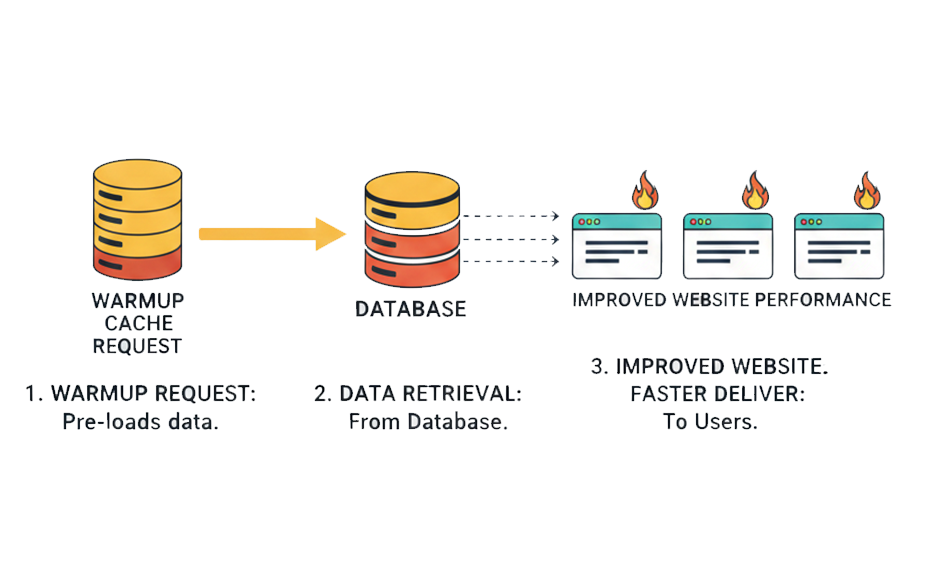
TL;DR: A warmup cache request preloads your cache before real users arrive, preventing slow first visits and reducing TTFB. In this guide, you’ll learn how cache warming works, why it matters for performance and SEO, and how to implement effective strategies to deliver consistently fast load times.
A warmup cache request is a proactive technique that sends automated HTTP requests to pre-populate caching layers before real users arrive. Instead of letting the first visitor trigger slow backend processing and database queries, it ensures that frequently accessed pages and assets are already stored in cache and ready to be delivered instantly.
When supported by well-planned cache warming strategies, this approach reduces TTFB (Time To First Byte), lowers origin server load, and removes the “first-visit penalty” that typically occurs after deployments, cache purges, or restarts. In simple terms, cache warming shifts performance from reactive to engineered, so every visitor experiences fast, reliable load times from the very first request.
Hot Cache vs Cold Cache
A cold cache occurs when the cache is empty or has been recently cleared, such as after a deployment, server restart, or CDN purge. In this state, every request results in a cache “miss,” meaning the system must fetch data from the origin server, run backend logic, and often execute database queries before delivering a response.
A hot (or warm) cache, on the other hand, already contains frequently accessed content. Requests are served directly from edge cache or memory layers, significantly reducing response time.
Here’s a simple comparison:
| Attribute | Cold Cache | Hot Cache |
|---|---|---|
| Initial State | Empty or recently cleared | Pre-populated with cached content |
| Response Time | Slower due to origin processing | Faster due to cache hits |
| Backend Load | Higher per request | Lower once cache is primed |
| User Experience | Slower first visits | Consistent, predictable speed |
When a request hits a cold cache, it increases TTFB because the browser must wait for the server to generate the response. In contrast, a hot cache delivers content almost instantly from faster storage layers.
Why Cache Warming Matters for Modern Websites
Users and search engines expect instant performance from the very first visit. A properly executed cache warming request ensures fast TTFB (Time To First Byte), stable load times after deployments, and consistent speed during traffic spikes, without relying on real users to “warm” your cache.
Without proactive cache warming, your site only becomes fast after someone else triggers cache population. That means the first visitor experiences a cold cache, slower server processing, and higher TTFB. In today’s performance-driven landscape, that variability can hurt both UX and SEO.
This becomes especially critical during:
- Deployments or cache purges, where caches are reset, and pages must be regenerated.
- High-traffic campaigns, where unwarmed pages can overload the origin server.
- CDN or edge expansions, where new nodes start empty and serve slower first loads.
Effective cache warming strategies eliminate this unpredictability. Instead of reacting to traffic, your infrastructure proactively prepares critical pages in advance, resulting in higher cache hit ratios, reduced backend strain, and consistent performance from the first user to the millionth.
Key Benefits of Warmup Cache Requests
A well-planned strategy delivers measurable technical and business advantages. It’s not just about speed, but about stability, scalability, and search visibility.
1. Fast Performance on First Visits
When a page is served from cache instead of being generated dynamically, the browser receives content significantly faster. According to Google, faster server response times directly contribute to better Core Web Vitals performance, especially Largest Contentful Paint (LCP). Since TTFB is the foundation of page load, lowering it through cache warming helps ensure that even first-time visitors experience near-instant responses instead of backend processing delays.
In practical terms, a warm cache eliminates the “first visitor penalty” that cold caches create after deployments or purges.
2. Reduced Backend Load
Each cache miss forces your origin server to process requests, run database queries, and assemble responses. At scale, this significantly increases CPU and database strain. Offloading requests to edge caching layers reduces origin infrastructure load and improves scalability during high-traffic events.
By proactively issuing a cache warming request, you reduce the number of expensive origin hits, which can translate into lower hosting costs and improved infrastructure efficiency.
3. Stable Performance During Traffic Spikes
Traffic spikes are where cold caches become dangerous. When thousands of users simultaneously hit uncached pages, origin servers can bottleneck.
Higher cache hit ratios directly correlate with improved resilience under traffic surges. Proactive cache warming strategies ensure that critical landing pages, product pages, and checkout flows are already cached before campaigns go live, protecting performance during peak demand.
4. Better SEO and Engagement Metrics
Performance impacts rankings and user behavior. Lower TTFB contributes to improved Core Web Vitals scores, which can positively influence organic visibility.
Beyond rankings, faster server responses reduce bounce rates and increase user engagement. Multiple industry performance studies show that even small improvements in load time can increase conversion rates and user retention.
5. Global Consistency with CDN Edge Warming
Modern websites serve global audiences. When CDN edge nodes start cold, users in certain regions may experience slower first loads.
By issuing distributed warmup cache requests across edge locations, you ensure consistent latency worldwide. This approach improves regional TTFB and provides uniform performance, regardless of geography, a key requirement for international SEO and user trust.
How Cache Warming Improves Website Performance (and TTFB)
At its core, cache warming improves performance by increasing the cache hit ratio, the percentage of requests served directly from cache instead of the origin server.
When a cache hit occurs:
- The request bypasses heavy backend logic.
- No database queries are executed.
- The response is delivered from memory or edge storage.
This dramatically reduces response time.
According to performance guidance from Google, server response time (TTFB) plays a critical role in overall page performance and Core Web Vitals outcomes. A warm cache ensures the first byte is delivered almost immediately, allowing rendering to begin sooner.
Similarly, many other studies indicate that increasing cache efficiency can significantly reduce origin load and improve overall delivery speed. While exact gains vary by infrastructure, organizations commonly report substantial reductions in response time when moving from cold-cache to high cache-hit environments.
In simple terms:
- Cold cache → origin processing → higher TTFB
- Warm cache → cached delivery → lower TTFB
That reduction in server response time cascades into faster LCP, smoother interactivity, and improved user engagement. When implemented properly, a consistent process transforms performance from reactive (waiting for traffic to optimize itself) to engineered and predictable.
Types of Cache That Benefit from Warming
Modern web architecture includes multiple caching layers, and each layer can benefit from proactive cache warming to reduce TTFB and improve overall delivery speed.
1. Browser Caches (Client-Side)
Browser caches store static assets, CSS, JavaScript, images, and fonts locally on a user’s device. While browser caching primarily improves repeat visits, warming upstream layers (like CDN or reverse proxy) ensures those assets are delivered quickly on the first visit, allowing the browser to cache them sooner.
In short, browser caching handles repeat performance, while a proper cache warming request ensures the initial fetch is fast enough to create that cached state in the first place.
2. Reverse Proxy Caches
Reverse proxies such as Varnish and NGINX sit between users and your origin server. They cache full HTML responses or dynamic content fragments, reducing the need to regenerate pages on every request.
When these layers start cold, after a deployment or purge, every request hits the backend. A targeted cache warmup request can preload important routes, significantly reducing server processing time and stabilizing TTFB immediately after release cycles.
3. CDN Edge Caches
Even when content is distributed through edge nodes, newly created or recently purged caches start empty. That means the first user in a region often experiences slower load times.
Without proper cache warming, performance becomes geography-dependent. Distributed cache warming strategies help preload critical pages across locations, ensuring users get consistent load times instead of region-based variability.
4. In-Memory Caches
In-memory systems such as Redis and Memcached store query results, session data, or computed fragments in RAM for extremely fast retrieval.
After restarts or deployments, these caches reset. If not warmed, database queries spike until the cache naturally rebuilds. Proactively issuing a cache warming request at application startup helps maintain database stability and prevents performance dips during peak usage.
Effective Cache Warming Strategies
Not all warming approaches are equal. Effective cache warming is targeted, automated, and aligned with business priorities.
Preload Critical Pages First
Start with your most valuable URLs, homepage, category pages, product pages, pricing pages, and checkout flows. These routes typically drive revenue and traffic. By prioritizing them in your warmup cache request sequence, you ensure high-impact pages maintain low TTFB even after deployments.
This approach improves perceived performance where it matters most, rather than wasting resources warming low-traffic URLs.
Simulated User Crawlers
Using headless browsers or controlled bots to simulate real user journeys is one of the most effective cache warming strategies. These crawlers follow internal links, execute scripts, and trigger dynamic rendering, helping warm not just static HTML but also API endpoints and edge logic.
Because they mimic actual user behavior, they prepare your infrastructure for real-world navigation paths, not just isolated URLs.
Scheduled Warmup Jobs
Automation is essential. Integrating cache warming requests into your CI/CD pipeline ensures caches are warmed immediately after deployments or cache invalidations.
For example:
- After pushing a release → automatically trigger warmup scripts.
- After clearing CDN cache → re-prime top URLs.
- At scheduled intervals → maintain cache freshness for expiring assets.
This reduces performance volatility and prevents cold-cache windows from impacting users.
Edge CDN API Triggers
Many enterprise CDNs provide APIs that allow direct cache preloading at edge locations. Instead of waiting for organic traffic, you can push specific assets or routes to regional nodes in advance.
This is particularly useful for:
- Product launches
- Seasonal landing pages
- Marketing campaign URLs
- Region-specific content
By combining API-driven warming with smart URL prioritization, you improve cache hit ratios globally and maintain consistent TTFB regardless of geography.
When layered together, reverse proxy, Content Delivery Network, and in-memory cache warming strategies create a predictable, high-performance delivery system. Rather than relying on traffic to “naturally” optimize performance, you proactively engineer speed into your infrastructure.
A warming cache request can be executed in several practical ways depending on your infrastructure. These methods focus on how you technically trigger cache population across different layers.
1. Direct HTTP Preloading
The most straightforward method is sending automated HTTP requests to important URLs. These requests behave like normal user visits, allowing reverse proxies, CDNs, and application caches to store the generated response.
For example, a simple script can loop through a list of priority URLs:
- curl -s -o /dev/null https://example.com/
- curl -s -o /dev/null https://example.com/products
- curl -s -o /dev/null https://example.com/pricing
Each request primes the cache so the next real visitor receives a cached response with lower TTFB.
This method works well for static and semi-dynamic pages.
2. Headless Browser Crawling
For dynamic websites, especially those using JavaScript frameworks, a basic HTTP request may not trigger full rendering. In such cases, headless browsers (like automated Chromium instances) simulate real user journeys.
These crawlers:
- Execute JavaScript
- Trigger API calls
- Follow internal links
- Load dynamic components
This approach is more comprehensive and aligns well with advanced cache warming strategies, particularly for SPAs or personalized applications.
3. CI/CD Deployment Hooks
Modern teams integrate cache warming requests directly into deployment workflows. After pushing a new release or purging cache, a script automatically runs to re-prime critical pages.
This prevents post-deployment slowdowns and ensures users never encounter a cold cache immediately after updates.
4. CDN Prefetch or API-Based Warming
Enterprise CDNs such as Cloudflare and Akamai Technologies provide APIs or prefetch mechanisms to preload assets at edge locations.
Instead of waiting for organic traffic to populate regional nodes, you can programmatically push important URLs to global edges, ensuring consistent performance worldwide.
5. Application-Level Cache Priming
For in-memory stores like Redis, applications may preload frequently accessed queries or computed results during startup. This avoids database spikes when traffic resumes after a restart.
In practice, high-performing systems often combine multiple methods: edge warming for global consistency, reverse proxy warming for HTML speed, and in-memory priming for database stability.
Best Practices for Cache Warmup Implementation
While the methods above explain how to send a request, best practices ensure you do it efficiently, safely, and strategically.
Prioritize High-Impact URLs
Not every page needs warming. Focus first on:
- Homepage
- High-traffic landing pages
- Revenue-generating pages
- Critical API endpoints
Warming thousands of low-traffic URLs wastes resources and may strain infrastructure unnecessarily.
Throttle Warmup Requests
Sending too many cache warming requests at once can overload your origin server, ironically causing the performance issues you’re trying to avoid.
Introduce rate limiting or batching. Gradually warm the cache instead of flooding it.
Align Warmup with Cache Invalidation
Cache warming is most effective immediately after:
- Deployments
- CDN purges
- Infrastructure restarts
Tie warming scripts directly to these events. This eliminates cold-cache windows and stabilizes TTFB during sensitive transitions.
Monitor Cache Hit Ratio and TTFB
Measure before and after implementation. Track:
- Cache hit/miss ratio
- Server response time
- Regional TTFB differences
- Backend CPU and database load
If hit ratios are not improving, your cache headers or warming logic may need adjustment.
Respect Cache-Control and Freshness Policies
A cache warming strategy should work with your caching rules, not against them. Ensure proper Cache-Control, ETag, and expiration headers are configured. Otherwise, warmed content may expire too quickly or bypass caching entirely.
Avoid Warming Personalized or Sensitive Content
Do not warm pages that vary per user (account dashboards, personalized carts, private APIs). Doing so may create cache fragmentation or security risks.
When implemented thoughtfully, cache warming becomes predictable infrastructure engineering rather than a reactive fix. The goal isn’t simply to send a cache warming request; it’s to increase cache efficiency, stabilize TTFB, and ensure consistent performance from deployment to peak traffic.
Common Challenges and Solutions
Requests must be implemented carefully. Poor execution can waste resources or even create instability.
1. Over-Warming the Cache
Not every URL deserves to be warmed. Triggering thousands of low-value pages increases origin load without meaningful performance gains. This can temporarily spike CPU usage and database queries, especially right after deployments.
Solution:
Adopt selective cache warming strategies. Prioritize high-traffic and revenue-driving URLs first. Use analytics data to determine which routes genuinely impact TTFB and user experience.
2. Dynamic or Non-Cacheable Content
Some content varies by user session, authentication state, or personalization logic. Attempting to warm such pages can either fail (because they aren’t cacheable) or create fragmented cache entries.
Solution:
Audit cache headers (Cache-Control, Vary) and exclude personalized routes like dashboards, carts, and account pages. Focus your cache warming request efforts on publicly cacheable endpoints.
3. Stale Content Risks
If you warm content but don’t align it with invalidation rules, you risk serving outdated pages. This is especially sensitive for pricing, inventory, or time-sensitive landing pages.
Solution:
Pair cache warming with smart invalidation. Trigger warmup immediately after purges or deployments to maintain freshness while preserving low TTFB.
Security Considerations for Cache Warming
A cache request, especially warmup one, is automated traffic, it can resemble bot activity if not configured properly. That introduces potential security and compliance concerns.
1. Proper Identification
Always set a clear and identifiable user-agent string for warmup scripts. This helps distinguish legitimate warming traffic from malicious bots and prevents accidental blocking by firewalls or rate-limiting systems.
2. Protect Sensitive Routes
Never include admin panels, staging environments, private APIs, or authenticated pages in your warming scripts. Accidentally caching protected routes can expose data or create caching inconsistencies.
3. Respect Robots.txt and Access Controls
If you use crawler-based warming, ensure it respects robots.txt, firewall rules, and access policies. Over-aggressive warming can trigger security systems or CDN throttling, negatively impacting real users.
When implemented thoughtfully, cache warming strengthens performance without compromising security or efficiency. The goal is controlled optimization, improving cache hit ratios and stabilizing TTFB without introducing unnecessary risk.
Conclusion
Cache warming request is a simple yet powerful tool for achieving consistently fast websites. It bridges the performance gap between cold starts and optimal delivery, improving TTFB, reducing backend load, and enhancing user experience. When implemented with strategy, automation, and measurement, cache warming becomes an essential part of resilient web infrastructure that delivers speed on demand.
FAQs
1. What is a warmup cache request?
2. How does a warmup cache request improve TTFB?
3. What’s the difference between a hot cache and a cold cache?
4. Do all sites need cache warming?
5. What is the impact of warming up cache?
6. How can I measure cache warming success?
7. Does cache warming affect SEO?
8. Can cache warming cause backend strain?
9. Should warmup be automated?

Ishan Makkar
He is a web performance specialist with hands-on experience optimizing websites for speed, media efficiency, and user engagement. As the founder of Website Speedy and Image Optimizer Pro, he has helped businesses across multiple industries improve load times, strengthen SEO, and reduce bounce rates. His work focuses on creating reliable, data-driven optimization solutions that deliver measurable results and build long-term digital trust.