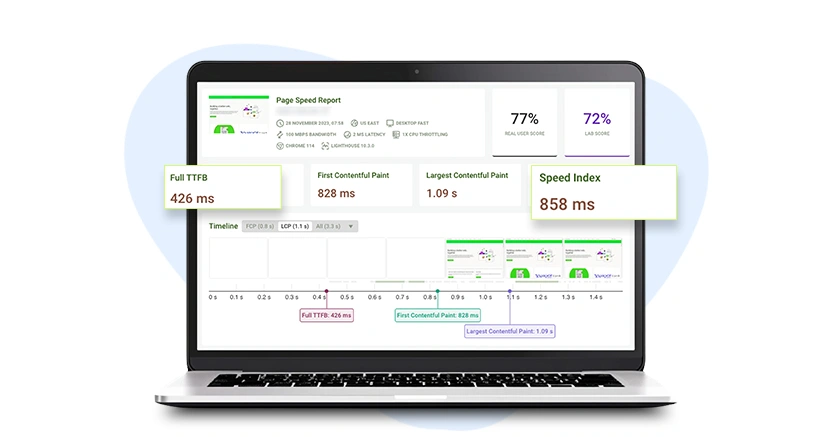
TL;DR: Manual optimization gives control but requires continuous effort, while automated tools maintain performance consistently with minimal involvement. For most websites, automation offers a more practical, scalable way to maintain fast load speeds and strong Core Web Vitals over time.
A slow website directly impacts conversions, rankings, and user experience. When it comes to fixing it, there are two approaches: manual optimization or automated tools. But they’re built for very different situations, skill levels, and budgets. The debate around manual vs automated website speed optimization isn’t really about which one is “better”, it’s about which one is right for your website, your business, your team, and how much time you’re willing to spend.
What is Manual Website Speed Optimization
Manual optimization for website speed means a developer (or a technically confident site owner) identifies performance issues and fixes them directly in the code, server settings, or asset pipeline. No shortcuts, every improvement is deliberate and implemented by hand.
Common Techniques for Manual Website Speed Optimization
Here are some of the most common techniques used for manual optimization.
1. Image compression and format conversion are usually the first place developers look. Oversized images are one of the most common causes of slow load times. Compressing them and converting to modern formats like WebP can shave significant weight off a page, but this needs to be repeated every time new images are added.
2. Minifying CSS, JavaScript, and HTML means removing whitespace, comments, and redundant characters from code files to make them smaller and faster to download. The process needs to be re-run whenever code changes, which adds ongoing overhead.
3. Eliminating render-blocking resources is where things get genuinely technical. Scripts and stylesheets that load before the page renders delay how quickly users see content. Fixing this means restructuring resource loading, adding async or defer to scripts, or inlining critical CSS. Done right, it directly improves Largest Contentful Paint (LCP) and Total Blocking Time (TBT) scores.
4. Browser caching lets returning visitors load a site faster by storing static assets locally. Setting it up requires editing server configuration files, which means having actual server access, something not every platform allows.
5. Lazy loading ensures images below the fold only load when a user scrolls near them, reducing the initial page weight. Simple to implement once, but easy to miss as new content is added over time.
Why Manual Website Speed Optimization Is Hard to Maintain
The upfront work is manageable with a developer. The harder problem is that websites don’t stay static, content changes, scripts get added, and plugins get updated. Each of these can undo what was optimized. Without ongoing maintenance, a manually tuned site drifts back toward slow load times within weeks. Manual speed optimization is also largely off the table on platforms like Shopify, Wix, or Webflow, where users don’t have access to server configuration or core code files.
What is Automated Website Speed Optimization
Automated optimization hands the work off to a tool. Instead of a developer addressing each issue manually, the tool identifies and applies optimizations on its own, often in real time, without touching the website’s underlying code. When it comes to automated optimization for website performance, the real value is that improvements happen consistently, without anyone having to manage them.
Two Main Types of Automated Website Speed Optimization Tools
1. CDN services improve performance by serving a website’s content from servers geographically closer to the user. This reduces the distance data has to travel, which helps with Time to First Byte (TTFB) and overall load times, especially for visitors in different countries. That said, a CDN alone doesn’t fix render-blocking scripts, lazy loading gaps, or Core Web Vitals issues. It’s one piece of the puzzle, not a complete solution.
2. Script-based optimization tools are the more complete option. A lightweight script is added to the site’s header, and that’s the entire setup. From there, the tool handles everything automatically: reorganizing how scripts and stylesheets load, implementing lazy loading, deferring nonessential resources, and continuously improving Core Web Vitals. No coding required, no platform restrictions. These tools work the same way whether the site runs on WordPress, Shopify, Wix, Webflow, BigCommerce, or any custom-built platform.
What Automated Tools Get Right That Manual Can’t
An automated tool continuously applies optimizations, even as content changes. There’s no degradation over time, no need to re-run processes after updates, and no developer required for day-to-day maintenance. For site owners who don’t have a developer on retainer, this is the difference between a site that stays fast and one that quietly gets slower every month.
Manual vs Automated Website Speed Optimization: Key Differences
Automated optimization is faster to implement and easier to maintain, while manual optimization offers deeper control but requires ongoing effort.
When Should You Use Manual Website Speed Optimization?
Manual optimization isn’t outdated, it’s just better suited to specific situations.
- Large custom-built applications with architecture-level bottlenecks, slow database queries, inefficient API calls, and bloated code need a developer who understands the system from the inside. An external optimization layer can’t fix structural code problems.
- Server-side performance issues like consistently high TTFB point to hosting or backend inefficiency. These require infrastructure-level changes that no delivery-layer tool can address.
- Building a new site is the ideal moment to bake in manual best practices from the ground up, a lightweight structure, clean code, and minimal unnecessary scripts. Getting foundations right during development is far easier than fixing them later.
In short, manual optimization works best as a one-time foundational effort. Where it struggles is ongoing maintenance on a live, evolving website.
When Should You Use Automated Website Speed Optimization?
For the majority of websites (small to mid-size businesses, eCommerce stores, service sites, agencies), automated tools for website speed cover the most impactful improvements with a fraction of the effort. No developer dependency means performance is maintained regardless of how often the site changes.
It’s especially the right choice when the site runs on a platform where direct code access isn’t available, when there’s no in-house developer for ongoing performance work, or when results are needed quickly without a full development cycle.
For most website owners, the practical reality is this: manual optimization requires continuous effort to maintain. Automated optimization does the work on its own, every day, in the background.
Final Verdict
Manual and automated optimization cover different layers of the same problem. Manual is best for foundational decisions during development. Automated is what keeps a live site consistently fast as it grows and changes. For most website owners, especially those on platforms where direct code access isn’t an option, automated tools like Website Speedy are simply the more practical and sustainable path to better performance.
People Also Ask
1. Is automated speed optimization safe for websites?
2. Can automated tools fully optimize a website?
3. When does manual optimization make more sense?
4. Which approach is better for long-term performance?
5. Do automated speed tools work on platforms other than WordPress?
About the Author