TL;DR: Speculation Rules API performance helps improve website speed by preloading or prerendering pages before users navigate. This leads to faster page loads, smoother transitions, and better Core Web Vitals. It works best for predictable user journeys and, when implemented correctly, can enhance both user experience and SEO performance. Learn where API works best and how to implement it easily for website speed optimization.
Page speed is no longer just about optimizing assets on the current page, it’s increasingly about how quickly users can move between pages. As navigation delays continue to impact both user experience and Core Web Vitals, developers are turning to predictive loading techniques to stay ahead. One approach gaining serious attention is the Speculation Rules API, which allows browsers to preload likely next pages based on user behavior.
But how effective is it in practice? Can it truly deliver faster, seamless navigation at scale? This is where Speculation Rules API performance becomes critical. In this guide, we’ll break down real-world test results, examine how prerendering and prefetching behave in live environments, and explore whether this API genuinely improves website speed, or if the benefits are more situational than universal.
What Is the Speculation Rules API?
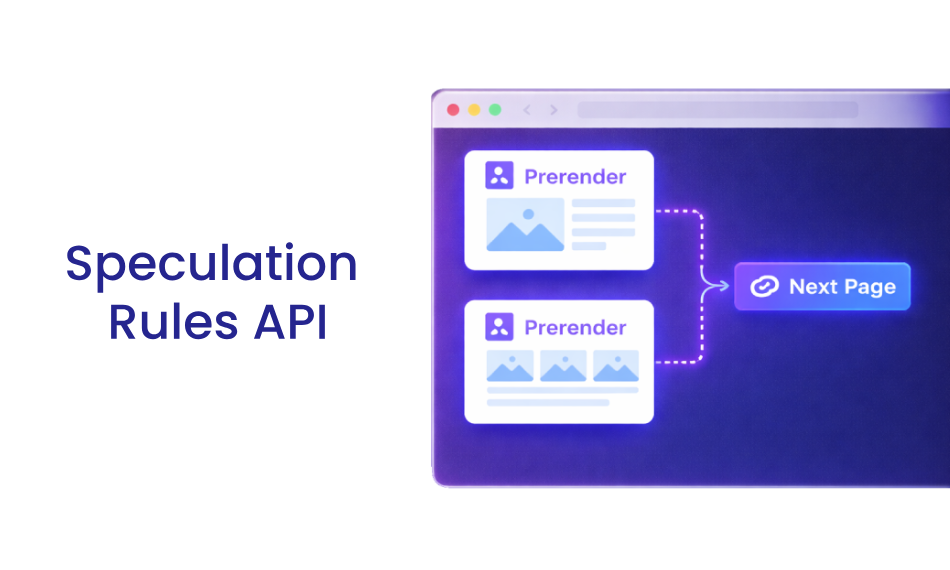
The Speculation Rules API is a modern browser feature that allows websites to anticipate user navigation and load pages in advance, reducing the delay users typically experience after clicking a link. Instead of waiting for a request to start only after interaction, the browser proactively prepares likely next pages based on defined rules.
It works through two core techniques:
- Prefetching – The browser fetches key resources like HTML in advance and stores them in cache. When the user clicks, the page loads much faster because the initial request is already complete.
- Prerendering – The browser goes a step further by loading the entire page (including scripts and rendering) in the background. When the user navigates, the page appears almost instantly.
What makes this API different from traditional prefetching methods is its rule-based intelligence. Developers can define conditions, such as specific link patterns or user behaviors, to control which pages should be loaded and when. This ensures resources are used efficiently, avoiding unnecessary network usage while still delivering faster navigation.
In simple terms, instead of reacting to user actions, the Speculation Rules API helps your website stay one step ahead, making page transitions feel seamless and significantly improving perceived performance.
Why It Matters for Modern Performance
Traditional performance optimization techniques focus on improving the current page. The Speculation Rules API shifts the focus to future navigation, which is where most delays happen. This makes it one of the most impactful modern web performance optimization techniques available today.
What’s often overlooked is that users don’t experience a website as isolated pages, they experience it as a continuous journey. Even if your initial page loads quickly, delays during navigation (like clicking to a product page or moving through a funnel) can break that experience. By preparing the next page in advance, the Speculation Rules API minimizes these transition gaps, making interactions feel instant and significantly improving perceived performance, engagement, and overall user satisfaction.
How Speculation Rules API Works (With Example)
At its core, the Speculation Rules API works by giving the browser clear instructions about which pages a user is likely to visit next. Instead of guessing blindly, the browser follows structured rules defined by the developer to decide when to prefetch or prerender content. These rules can be based on link patterns, user interactions, or page context, making the process far more precise than traditional methods.
Another important aspect is “eagerness,” which controls how aggressively the browser should preload pages. For example, a conservative approach might only load pages when a user hovers over a link, while a more eager setting may start loading as soon as links appear in the viewport. This flexibility allows you to balance performance gains with resource usage.
The API works by defining rules in JSON format:
<script type="speculationrules">
{
  "prerender": [
    {
      "source": "document",
      "where": {
        "href_matches": "/product/*"
      },
      "eagerness": "moderate"
    }
  ]
}
</script>
What This Does
- Identifies likely navigation paths
- Preloads those pages in advance
- Delivers near-instant page transitions
In this example, the browser is instructed to prerender any link that matches /product/*, which is common in e-commerce journeys. When a user clicks on a product page, the content is already loaded in the background, eliminating the usual loading delay.
This is where Speculation Rules API prerendering becomes especially powerful. Instead of simply speeding up requests, it removes the waiting time altogether, creating a near-instant browsing experience. When implemented strategically, this approach complements broader website speed optimization strategies by reducing delays not just on page load, but during navigation as well.
How We Evaluated Speculation Rules API Performance
To understand real-world impact, we analyzed Speculation Rules API performance using a combination of lab and field data. Key metrics included LCP, TTFB, and overall navigation latency.
We referenced publicly available case studies, browser documentation, and aggregated performance data to ensure results reflect real production environments rather than isolated tests.
Speculation Rules API Performance: Real Test Results
Let’s move beyond theory and look at actual data. These Speculation Rules API real test results show how it performs in production environments.
| Metric | Without Speculation Rules | With Speculation Rules |
|---|---|---|
| LCP | 1.8s | 0.32s |
| TTFB | 300ms | 45ms |
| Navigation Delay | High | Near-zero |
1. Ray-Ban Case Study
Ray-Ban implemented prerendering on product listing pages.
- LCP dropped from 4.69s → 2.66s (43% improvement)
- Mobile conversions increased by 101%
- Desktop conversions increased by 156%
This clearly shows how Speculation Rules API performance impacts both speed and revenue.
| Device | LCP | Conversion Rate change | Exit Rate change | Prerender rate | ||
|---|---|---|---|---|---|---|
| Before | After | Change | ||||
| Mobile | 4.69s | 2.66s | 43.28% | +101.47% | -13.25% | 29% |
| Desktop | 3.03s | 1.74s | 42.57% | +156.16% | -13.18% | 50% |
| Source: CrUX URL-level data for Aviator PDP pages. | ||||||
2. Shopify Platform Rollout (2025)
Shopify introduced conservative prefetching across its ecosystem.
- 130ms improvement (desktop)
- 180ms improvement (mobile)
- Improvements observed across all paint metrics
Even small gains at scale significantly improve website speed with the Speculation Rules API.
3. Cloudflare Speed Brain
Cloudflare integrated speculation rules into its performance stack.
- Up to 45% LCP reduction for successful prefetches
This highlights the browser speculation rules API benefits when combined with CDN-level optimization.
4. Google Search Implementation
Google itself uses speculation rules for search results.
- 67ms faster LCP on Android
If Google relies on it, that’s a strong signal of its real-world effectiveness.
5. CoreDash Aggregate Data
Data aggregated by Core Web Vitals monitoring platforms such as CoreDash highlights significant performance gains from prerendered navigations across real-world websites.
- Prerendered LCP (p75): 320ms
- Standard navigation LCP: 1800ms
- 82% improvement
Additional insights:
- ~28% of navigations were successfully preloaded
- Prefetched pages show TTFB as low as 45ms
These results show that while not every navigation is preloaded, the ones that are deliver near-instant experiences. Even with partial adoption, these improvements often occur on high-intent user journeys, making a noticeable impact on overall perceived performance and engagement.
Prerender vs Prefetch: Which Performs Better?
Understanding prerender vs prefetch performance is critical for implementation.
| Technique | Speed Impact | Resource Usage | Best Use Case |
|---|---|---|---|
| Prefetch | Moderate | Low | Broad navigation paths |
| Prerender | High | High | High-intent pages |
Expert Insight
- Use prefetching for scalability
- Use prerendering for high-conversion journeys
A hybrid strategy often delivers the best Speculation Rules API website speed results. This comparison also highlights the Speculation Rules API SEO impact, as faster navigation directly improves user engagement signals.
Do Speculation Rules API Improve Speed?
The short answer is yes, but the real impact depends heavily on how and where it’s implemented.
The Speculation Rules API is most effective when user behavior is somewhat predictable. In these cases, the browser can confidently preload or prerender the next likely page, reducing or even eliminating navigation delays.
Where It Works Best
It performs exceptionally well in structured user journeys, such as:
- E-commerce product flows, where users move from listing pages to product details
- Blog-to-blog navigation, especially when internal linking is strong
- Funnel-based journeys, like signup, onboarding, or checkout flows
In these scenarios, Speculation Rules API performance can significantly reduce perceived load times and create near-instant transitions.
When It’s Not the Right Fit
Speculation Rules API may not be ideal for:
- Logged-in dashboards with constantly changing data
- Highly dynamic or personalized content
- Low-bandwidth or data-sensitive environments
In these cases, aggressive preloading can waste resources without improving performance.
Impact of Speculation Rules API on Core Web Vitals & SEO
One of the most significant advantages of improved Speculation Rules API performance is its direct and indirect impact on Core Web Vitals, the metrics Google uses to evaluate real user experience.
LCP (Largest Contentful Paint)
Prerendering can dramatically reduce LCP because the next page is already fully loaded in the background before the user clicks. In many cases, this brings LCP close to “instant,” which is nearly impossible to achieve with traditional loading methods.
TTFB (Time to First Byte)
With prefetching, the browser retrieves HTML in advance and stores it in memory. This means that when navigation occurs, the server response is almost immediate, often reducing TTFB to near-zero levels.
INP (Interaction to Next Paint)
Faster navigation also improves responsiveness. Since the next page is already prepared, users experience minimal delay between interaction and visual feedback, leading to better INP scores.
Speculation Rules API SEO impact
These performance gains go beyond technical metrics, they influence rankings and user behavior:
- Faster load times contribute to better search visibility
- Smoother navigation improves engagement and session duration
- Reduced friction lowers bounce rates and improves conversion signals
These improvements clearly show how to improve website speed with Speculation Rules API while strengthening SEO performance.
Speculation Rules API vs Traditional Prefetching
Traditional prefetching lacks intelligence, it loads resources blindly.
Key Differences
| Feature | Traditional Prefetch | Speculation Rules API |
|---|---|---|
| Logic | Static | Rule-based |
| Accuracy | Low | High |
| Resource efficiency | Medium | Optimized |
| Browser support | Limited | Expanding (Chrome-first) |
The Chrome Speculation Rules API leads adoption, making it increasingly viable for production use.
Browser Support & Limitations
The Chrome Speculation Rules API currently has the strongest support in Chromium-based browsers. Support in other browsers is still evolving, which means implementation should follow a progressive enhancement approach.
How to Implement Speculation Rules API (Best Practices)
Implementing the Speculation Rules API effectively requires a balance between performance gains and resource efficiency. A thoughtful approach ensures you get the benefits without unnecessary overhead.
1. Start with Conservative Eagerness
Begin with “eagerness”: “moderate” or “conservative” to avoid overloading the browser or network. This allows the browser to preload pages only when there is a higher probability of navigation.
2. Focus on High-Intent Pages
Identify pages where users are most likely to navigate next, such as:
- Product detail pages
- Category or listing pages
- Checkout and funnel steps
Targeting these areas ensures that your efforts directly impact user experience and conversions.
3. Use Pattern-Based Rules
Instead of manually defining every URL, use patterns like /product/* or /blog/*. This makes your implementation scalable and easier to maintain as your website grows.
4. Monitor Real-World Performance
Track how your rules perform using tools like:
- Chrome DevTools (for debugging speculation activity)
- WebPageTest (for controlled testing)
- Real User Monitoring (RUM) tools (for actual user data)
5. Iterate Based on Data
Speculation Rules are not a one-time setup. Continuously refine your rules based on:
- User navigation patterns
- Conversion paths
- A data-driven approach helps maximize Speculation Rules API performance over time.
Common Pitfalls to Avoid
While the benefits are clear, poor implementation can reduce or even negate the impact of the Speculation Rules API performance. Understanding common mistakes helps you avoid unnecessary inefficiencies.
Over-Prerendering
Prerendering is resource-intensive. Loading too many pages in the background can:
- Increase bandwidth usage
- Consume device memory
- Negatively affect performance on low-end devices
Poor Targeting
If your rules don’t align with actual user behavior, preloaded pages may never be used. This reduces efficiency and limits the overall impact of the API.
Ignoring Analytics
Without monitoring results, it’s impossible to know whether your strategy is working. Blind implementation often leads to missed optimization opportunities.
Lack of Balance Between Prefetch and Prerender
Relying too heavily on prerendering can be costly, while using only prefetching may limit performance gains. A balanced strategy is key.
Why a Data-Driven Approach Matters
The most successful implementations are guided by real user data, not assumptions. By continuously analyzing performance and adjusting your rules, you can ensure that Speculation Rules API performance remains efficient, scalable, and impactful over time.
Quick Implementation Checklist
- Identify high-intent navigation paths
- Use moderate eagerness settings
- Apply pattern-based rules (e.g., /product/*)
- Monitor real-world performance
- Continuously optimize based on user behavior
Conclusion
So, does the Speculation Rules API live up to the hype?
Based on real-world data, from Ray-Ban to Shopify to Cloudflare, the answer is clear: Speculation Rules API performance delivers meaningful, measurable improvements in website speed and overall user experience.
However, it’s not a silver bullet. Its success depends on smart implementation, strategic targeting, and continuous monitoring.
When used correctly, it can transform navigation from a waiting game into an instant experience, something users (and search engines) increasingly expect.
FAQs
1. What is Speculation Rules API?
2. Does Speculation Rules API improve website speed significantly?
3. What is the difference between prerendering and prefetching?
4. Is Speculation Rules API good for SEO?
5. Can it improve Core Web Vitals?
6. Is it supported in all browsers?
7. When should I use prerendering instead of prefetching?
8. Does it consume more bandwidth?
About the Author