TL;DR: Website downtime can cost revenue, trust, and SEO rankings. This guide explains the common causes of downtime, early warning signs, and proven fixes. Following these website uptime best practices ensures your site remains accessible, fast, and resilient under traffic surges or attacks.
Website downtime can be one of the most costly problems a business faces in the digital economy. Whether you run an e-commerce platform, SaaS service, or content site, every minute your site is offline means lost revenue, diminished user trust, and degraded search performance. That’s why understanding how to prevent website downtime, recognize early warning signs, and implement real-world fixes is essential to safeguard your online presence.
In this comprehensive guide, we’ll explore the most common website downtime causes, how to detect them before they cripple your operations, and proven solutions backed by modern analytics and uptime strategies.
What Is Website Downtime And Why Does It Matter?
Website downtime refers to periods when your website is unavailable to users. This can happen for seconds, minutes, or even hours, and the impact grows with every tick of the clock. Downtime isn’t just a technical issue; it’s a business risk:
- For e-commerce sites, revenue losses can average thousands of dollars per hour of downtime.
- A large portion of outages occur after hours or when no one is watching.
Basic monitoring alone catches only a fraction of these issues; many outages slip through until a customer complains.
Understanding website uptime best practices and how to prevent website downtime is critical for any organization that depends on online availability.
Downtime Impact by Industry
| Industry | Downtime Impact |
|---|---|
| eCommerce | Lost sales, abandoned carts |
| SaaS | Churn, SLA breaches |
| Content Sites | Traffic loss, ranking drops |
| Enterprises | Reputation & compliance risk |
What are the Common Causes of Website Downtime?
| Cause | Frequency | Preventability |
|---|---|---|
| Hosting failures | High | Medium |
| Software updates | High | High |
| Traffic spikes | Medium | High |
| Cyberattacks | Medium | Medium |
| DNS/SSL issues | Low | Very High |
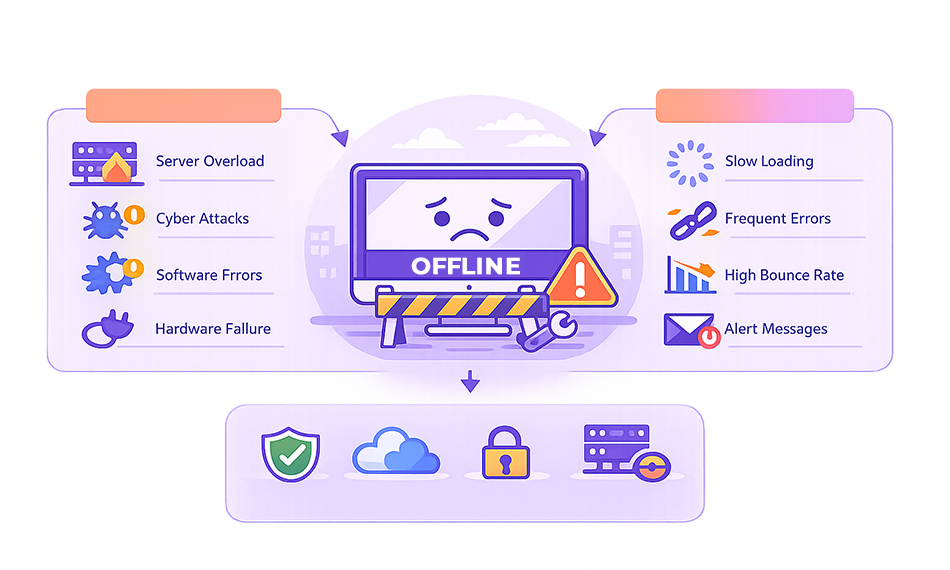
Website downtime commonly occurs due to server failures, hosting issues, software or plugin conflicts, cyberattacks, and sudden traffic spikes. Human errors, expired domains or SSL certificates, and poor server maintenance can also trigger outages. Below, we break down each cause in detail to help you identify and prevent them effectively.
1. Hosting & Server Failures
Your hosting server is the foundation of your site. Hardware failures, network outages from your provider, overloaded servers during traffic spikes, or hosting network issues can all take your site down.
Even robust cloud providers can experience incidents; without adequate redundancy, a single server crash can result in downtime.
2. Traffic Spikes & Overloads
Unanticipated surges in user traffic, such as flash sales, viral posts, or marketing campaigns, can overwhelm server resources and lead to downtime. Without scalable infrastructure, servers may refuse connections or crash.
Load balancers and CDN systems distribute traffic to minimize this impact.
3. Software & Configuration Issues
Outdated software, misconfigured settings, CMS plugin conflicts, database errors, and coding bugs are all common causes of downtime. These software problems frequently stem from a lack of maintenance or incompatible updates.
4. Cyberattacks & Security Breaches
Distributed Denial of Service (DDoS) and other attack vectors flood servers with malicious traffic, exploiting vulnerabilities and forcing sites offline. Weak security setups make your site vulnerable to these threats.
5. DNS & Connectivity Problems
The Domain Name System (DNS) connects your domain name to your server’s IP. Failures here make the site unreachable even if the server is operational. Network outages and bandwidth issues also disrupt service.
Early Warning Signs of Impending Downtime
Early warning signs of impending downtime include slow page loading, frequent server errors, unexpected traffic spikes, and repeated website crashes. Identifying these signals early helps prevent outages, and the key warning signs are explained in detail below.
Here’s an expanded yet clear and informative version of each sub-point, keeping the content concise and suitable for an informational blog:
Rising Latency & Slow Load Times
Performance degradation, such as increasing page load times or delayed server responses, is often an early indicator of resource strain. These slowdowns may result from high CPU usage, memory exhaustion, unoptimized code, or traffic surges. Regularly monitoring performance metrics helps detect issues before they escalate into downtime.
Failed Health Checks
Failed or inconsistent health checks signal that your website or server is struggling to respond properly. Automated uptime monitoring tools can detect partial outages, backend failures, or application errors early, allowing you to take corrective action before users experience a complete site outage.
Network Errors & Intermittent Failures
Recurring network errors, such as DNS lookup failures, timeouts, or intermittent connectivity, often point to underlying infrastructure or configuration issues. While these problems may appear sporadic at first, they can quickly worsen and lead to prolonged downtime if not addressed promptly.
Pending Maintenance Signals
Alerts from your hosting provider regarding scheduled updates, server maintenance, or hardware changes should never be ignored. These notifications help you prepare for potential disruptions, schedule maintenance windows, and communicate proactively with users to minimize the impact of downtime.
How to Prevent Website Downtime: 12 Proven Fixes That Work
Preventing website downtime requires a mix of reliable infrastructure, proactive monitoring, security hardening, and performance optimization. The following proven fixes help reduce failure risks, improve resilience, and ensure your website remains accessible even during unexpected events.
1. Choose a Reliable Hosting Provider
Your hosting provider plays a critical role in website uptime. A reliable host minimizes downtime by offering stable infrastructure, strong redundancy, and rapid technical support. Low-cost or poorly managed hosting environments often lack failover mechanisms, making them more prone to outages.
Key factors to look for:
- Guaranteed uptime SLA (99.9% or higher)
- Redundant servers and data centers
- 24/7 technical support and monitoring
- Cloud or managed hosting for scalability
Cloud hosting typically outperforms shared hosting by distributing workloads and preventing single points of failure.
2. Implement Website Uptime Monitoring
Website uptime monitoring tools continuously check your site’s availability, response time, and server health. These tools detect issues early and alert you before downtime impacts users or revenue. Proactive alerts allow faster troubleshooting and reduce the duration of outages.
Benefits of uptime monitoring:
- Instant alerts via email or SMS
- Detection of partial or regional outages
- Performance trend tracking
- Faster incident response
Tools like Pingdom, UptimeRobot, and New Relic help identify issues before they escalate into full downtime.
3. Use Content Delivery Networks (CDNs)
A Content Delivery Network (CDN) distributes your website’s static assets across multiple global servers. This reduces dependency on a single origin server, lowers latency, and absorbs traffic spikes that could otherwise cause crashes.
How CDNs prevent downtime:
- Reduce server load during high traffic
- Serve cached content if the origin server fails
- Improve global performance and reliability
- Provide built-in DDoS protection
By adding redundancy and traffic distribution, CDNs significantly improve uptime and stability.
4. Automated Backups & Disaster Recovery Plans
Downtime is inevitable at some point, but quick recovery minimizes its impact. Automated backups ensure your website data is regularly saved and can be restored instantly if something goes wrong. A disaster recovery plan prevents confusion during emergencies.
Best practices include:
- Daily or real-time automated backup
- Off-site and cloud-based backup storage
- One-click restore functionality
- Clearly documented recovery steps
Fast restoration reduces downtime duration and prevents data loss during server failures or cyberattacks.
5. Routine Maintenance & Software Updates
Outdated software is a common cause of website downtime and security breaches. Regular maintenance ensures your CMS, plugins, themes, and server software remain compatible, secure, and stable.
Maintenance tasks to schedule:
- CMS and plugin updates
- Server OS and database upgrades
- Broken link and error log checks
- Compatibility testing after updates
Planned maintenance windows help prevent unexpected outages caused by software conflicts or vulnerabilities.
6. Load Balancing & Redundancy
Load balancing distributes incoming traffic across multiple servers, preventing overload on a single system. If one server fails, traffic is automatically redirected to another, keeping your website online without interruption.
Why load balancing matters:
- Eliminates single points of failure
- Improves performance during traffic spikes
- Ensures high availability
- Enables seamless server failover
Redundant infrastructure is a core best practice for achieving enterprise-grade uptime, reliability, and long-term scalability.
7. Security Hardening
Cyberattacks are a major cause of unexpected website downtime. Security hardening protects your site from malicious traffic, unauthorized access, and exploitation of vulnerabilities that could crash your server.
Essential security measures:
- Web Application Firewalls (WAF)
- Malware scanning and removal
- Strong authentication and access controls
- Regular security audits
A secure website is far less likely to experience downtime due to attacks or data breaches.
8. Performance Optimization
Poorly optimized websites consume excessive server resources, increasing the risk of crashes during traffic surges. Performance optimization improves efficiency, enhances stability, and plays a direct role in website speed optimization, helping reduce strain on your hosting environment.
Key optimization techniques include:
- Image compression and lazy loading to reduce the initial page load size
- Minifying CSS, JavaScript, and HTML to improve rendering efficiency
- Database optimization to prevent query bottlenecks
- Efficient caching strategies to reduce repeated server requests
Effective website speed optimization ensures pages load faster while using fewer server resources, making websites more resilient under high traffic and significantly lowering the risk of downtime.
9. Monitor DNS & SSL Certificate Expiry
DNS misconfigurations and expired SSL certificates can silently make your website inaccessible. These issues often go unnoticed until users encounter security warnings or failed connections.
Preventive measures:
- Monitor DNS health and propagation
- Use secondary or redundant DNS providers
- Enable auto-renewal for SSL certificates
- Set expiration alerts
Proactive DNS and SSL monitoring prevents avoidable downtime caused by administrative oversights.
10. Implement Auto-Scaling for Traffic Spikes
Unexpected traffic surges can overwhelm fixed server resources. Auto-scaling automatically adjusts server capacity based on real-time demand, preventing crashes during high-traffic events.
Auto-scaling advantages:
- Handles viral traffic or seasonal peaks
- Prevents server overload
- Optimizes resource usage
- Improves availability during growth
This is especially critical for eCommerce sites, SaaS platforms, and marketing-driven campaigns.
11. Use Staging Environments for Testing
Many downtime incidents occur due to untested updates pushed directly to live websites. A staging environment allows you to test changes safely before deployment.
Why staging matters:
- Prevents plugin and theme conflicts
- Identifies errors before production release
- Enables rollback without user impact
- Ensures smoother updates
Testing updates before going live significantly reduces downtime caused by human error.
12. Log Monitoring & Error Tracking
Server logs and application error tracking reveal hidden issues that can lead to downtime if ignored. Continuous log monitoring helps detect anomalies early.
What to monitor:
- Server error logs
- Application crashes
- Database query failures
- Resource usage anomalies
Tools like log analyzers and error trackers provide early insights into problems before they disrupt availability.
Website Uptime Best Practices
To maintain consistent availability and minimize downtime risks, it’s essential to follow proven uptime best practices. These practices focus on early detection, structured response, and team readiness to ensure issues are resolved quickly and efficiently.
Monitor from Multiple Locations
Website outages don’t always affect all users equally; many issues are region-specific due to DNS failures, CDN routing problems, or network outages. Monitoring uptime from multiple geographic locations helps identify localized disruptions early and ensures your site remains accessible to a global audience.
Set Tiered Alerts
Relying solely on “site down” alerts can delay response times. Tiered alerts notify your team when performance degrades, such as increased response times or partial failures, before a full outage occurs. This proactive approach allows teams to address issues early and prevent complete downtime.
Use Staging Environments
A staging environment allows you to safely test updates, plugins, and configuration changes before deploying them to your live website. This practice significantly reduces downtime caused by software conflicts, broken updates, or human error during deployments.
Document Incident Response Plans
When downtime occurs, clear response procedures are critical. A documented incident response plan outlines who is responsible, what steps to take, and how to communicate during an outage. This reduces confusion, speeds up recovery, and ensures consistent handling of incidents.
Train Your Team
Even the best tools are ineffective without a knowledgeable team. Regular training ensures staff understand monitoring tools, response protocols, and recovery procedures. A well-prepared team can identify problems faster, respond efficiently, and minimize the overall impact of downtime.
Website Downtime vs Slow Website: What’s the Difference?
While both website downtime and slow performance impact user experience and rankings, they represent different technical problems. The comparison below explains how they differ and how each should be addressed.
| Factor | Website Downtime | Slow Website |
|---|---|---|
| Availability | Website is completely inaccessible | Website is accessible, but loads slowly |
| User Experience | Users cannot access any content | Users experience delays and frustration |
| Common Causes | Server failures, DNS issues, outages, cyberattacks | Heavy scripts, unoptimized images, poor caching |
| Impact on Conversions | Immediate loss of sales or leads | Increased bounce rates and drop-offs |
| SEO Impact | Affects crawlability and indexing | Impacts Core Web Vitals and rankings |
| Server Load | Server may be down or unreachable | Server is overloaded but still responding |
| Fix Approach | Server downtime prevention, failover, and monitoring | Website speed optimization and performance tuning |
| Prevention Strategy | Redundancy, uptime monitoring, and backups | Caching, optimization, and resource management |
Conclusion
Preventing website downtime isn’t just about reacting, it’s about building resilience into every layer of your digital stack. From choosing reliable hosting and CDN services to implementing stringent server downtime prevention systems and website uptime monitoring, every decision you make contributes to tighter uptime and better performance.
By understanding the primary website downtime causes, recognizing early warning signs, and adopting proven uptime strategies, you can protect your online presence against costly outages and maintain a reliable user experience that your visitors and search engines will reward.
FAQs
Q1. How to prevent server downtime?
Q2. What causes website downtime?
Q3. How to fix server downtime?
Q4. How does website downtime affect user experience?
Q5. How often should websites monitor uptime?

Ishan Makkar
He is a web performance specialist with hands-on experience optimizing websites for speed, media efficiency, and user engagement. As the founder of Website Speedy and Image Optimizer Pro, he has helped businesses across multiple industries improve load times, strengthen SEO, and reduce bounce rates. His work focuses on creating reliable, data-driven optimization solutions that deliver measurable results and build long-term digital trust.